1.225 FAQ-986 How to remove line between two points on a Line+Symbol plot?
Last Update: 4/16/2019
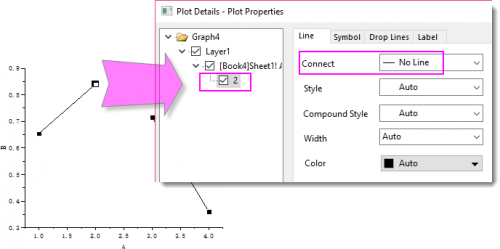
After plotted a Line+Symbol graph, you can choose to hide the line segment behind a special point as follow:
- CTRL + double clicking on the beginning point where you want to remove the connect line. It will open the Plot Details dialog with that point selected as special point.
- On the Line tab, set Connect to No Line.
 | If you are using Origin 2019 or earlier version, you can choose one of the following two ways to remove line between two points:
|
Keywords:remove line, break connect line, discontinuous line, separate section