6.110 FAQ-1198 How do concurrent license users know who is occupying the license at any given time?
Last Update: 7/10/2024
A concurrent license type means the purchased number of licenses are floating assigned among clients. If you are using a concurrent license, sometimes you may want to see who is checking out a license at the time, especially when all the available licenses are in used.
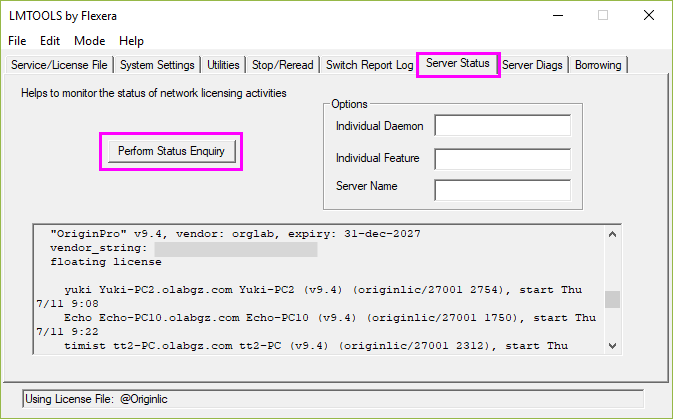
As the administrator of a concurrent license, you can always open LMTools and Perform Status Enquiry on Server Status tab. At the end of the output text, you can find the license check-out status.
As a client, you can choose one of the following ways to query license status from a client computer.
Method 1
- Copy the LMTools.exe file to the client computer(s).
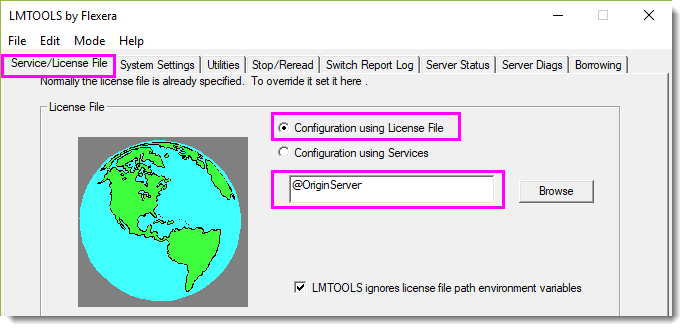
- Open LMTOOLS and go to the Service/License File tab.
- Select Configuration using License File radio button.
- Type
@SERVERNAMEor@IP_Address_Of_Server
in the edit box, where SERVERNAME is your license server name, and make sure to include the “@” symbol at the beginning. E.g. suppose your license server names “OriginServer”, set as following: - On the Server Status tab, click Perform Status Enquiry button and the output server status will show which clients occupy the licenses at the moment.
Method 2
- Copy the lmstat.exe file to the client computer(s). This file can be found in the \Tools\command line folder under the license manager folder.
- Open a text editor (e.g. Notepad), enter the following command lines and save it as a .bat file.
@echo off
<path_to_lmstat.exe>\lmstat.exe -a -c <port_no.>@SERVERNAME
pause
where <path_to_lmstat.exe> is the path to lmstat.exe file on the client computer, and SERVERNAME is your license server name. port_no. is the port number lmgrd.exe uses. It can be omitted if the default port 27000 is used, but the "@" symbol cannot be omitted. E.g. suppose you copy the lmstat.exe file to folder path C:\Tools\OriginLicenseServer\command line\, your license server names “OriginServer” and use port 27001, enter following lines in the .bat file:@echo off "C:\Tools\OriginLicenseServer\command line\lmstat.exe" -a -c 27001@OriginServer pause
- You can always double-click this .bat file to check the status.
Keywords:concurrent, License Management, license checkout status, occupy license, monitor license usage