5.41 FAQ-746 How can I transpose data when importing ASCII Data?
Last Update: 6/24/2022
Origin supports transposing ASCII data upon import.
To start:
- Create a new workbook (matrix) by clicking File: New: Workbook (or File: New: Matrix).
- Choose menu Data: Import from File: Single ASCII or Data: Import from File: Multiple ASCII , choose a dat/txt file then add it to the bottom panel. Make sure Show Options Dialog check box is selected. Click Open button.
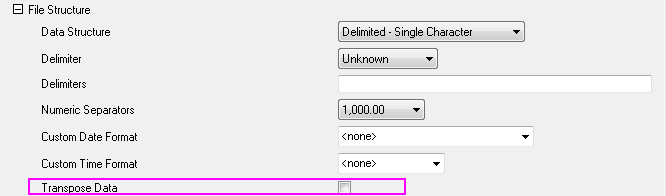
- In the opened dialog, under File Structure branch, select Transpose Data check box. Click OK to close the dialog.
 | In versions prior to Origin 2019b, the ASCII import dialogs are found under File: Import: Single/Multiple ASCII Prior to 2019, new workbooks were created by File: New: Worksheet. |
| Note: Import Wizard does not support this feature yet. |
Keywords:Import ASCII, data import, transpose
Minimum Origin Version Required: 2016 SR0