1.245 FAQ-1033 The end of my line is round. How can I make it to be square?
Last Update: 12/23/2019
Most of the lines in Origin, such as 2D and 3D curves, axes and ticks, line objects (including arrows), end in round shape by default.
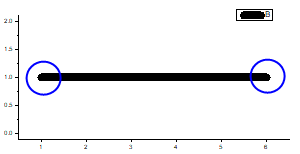
If you want to make the line cap square, choose proper system variable.
| System Variables | Take effect to | Values |
|---|---|---|
| LCP | 2D line plots | 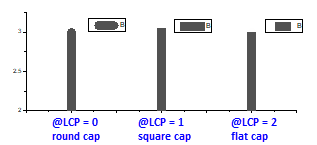
|
| LC3P | 3D line plots | 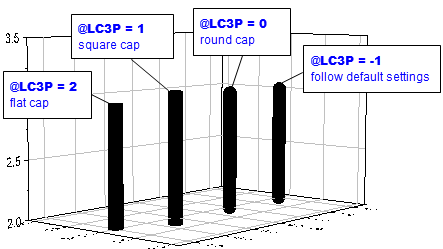
|
| LCA | axis line and ticks in 2D Cartesian coordinate | 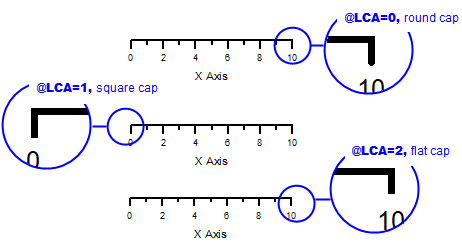
|
| LCAL | axis line and ticks in any 2D coordinate system |
@LCAL = -2:
@LCAL = -1:
|
| LCG | line cap of arrow, line, and polyline objects | 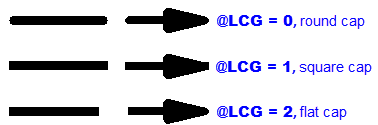
|
| LCT | line of frame around text and legend | 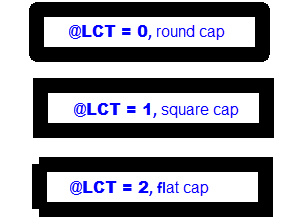
|
| LCR | line of rectangle objects |
@LCR = 0: round cap |
To set the system variable,
- Select Preferences: System Variables. In the dialog that opens, enter the proper system variable name(without "@") in Variable column, and enter the desired value in Value colulmn.
- Refresh the graph to see the change.
Keywords:square, round, line ends, legend frame, line object, arrow, rectangle, axis line end