2.137 FAQ-1186 How to insert one row for every certain number of rows?
Last Update: 7/25/2023
To insert one row for every N rows,
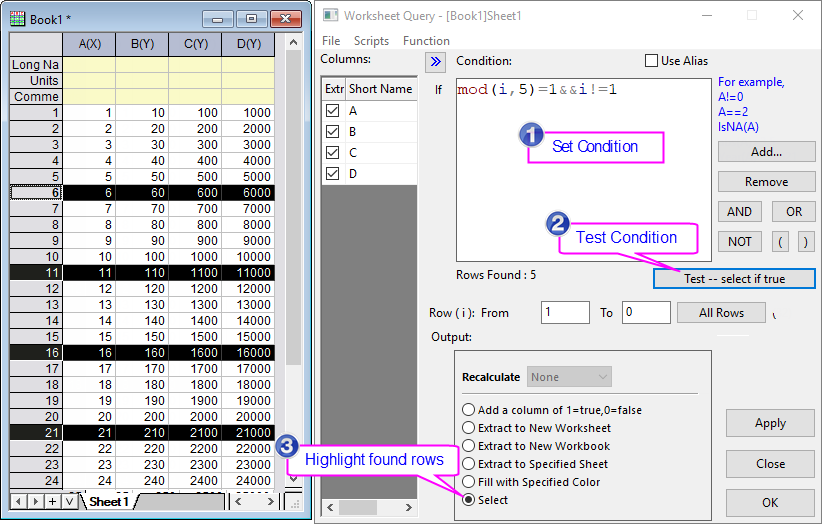
- With the worksheet active, select menu Worksheet: Worksheet Query.
- In the Worksheet Query dialog that opens, enter following Condition
mod(i,N)=1&&i!=1
to select every N rows. For example, if you want to insert one row for every 5 rows, entermod(i,5)=1&&i!=1
in the Condition edit box. - Click Test -- select if true button to test the condition. This will highlight every N rows.
- In the Output group, select Select radio button. Click OK button to close Worksheet Query.
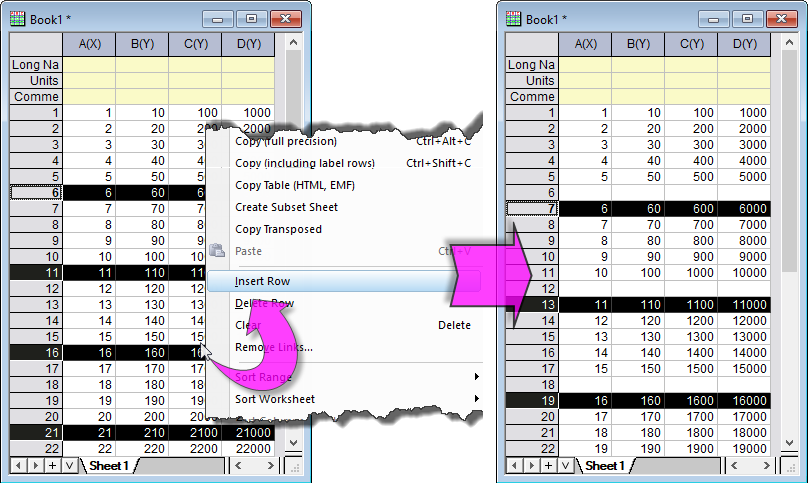
- Right click on any one of the selected rows and select Insert Row from the context menu. This will insert one row before each shighlighted row.
 |
|
Keywords:insert rows, insert columns, evenly insert, select every spaced rows