2.58 FAQ-1059 How to get the row index and value of visible cell after filtering data in Origin?
Last Update: 6/17/2020
User asks how to get the row index and value of visible cell after filtering data in Origin. E.g. see the image below.
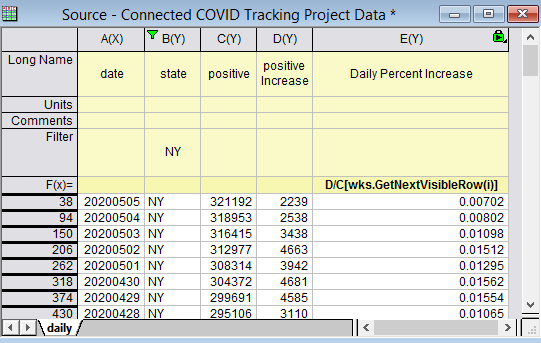
wks.GetNextVisibleRow(N) is a worksheet property added since Origin2016 to return the next visible row index starting from the given row N.
E.g. wks.GetNextVisibleRow(0)= will return the first visible row index 38.
col(Name)[wks.GetNextVisibleRow(N)] refers to next visible value in specified column after Nth row. E.g. in the image above, use D/C[wks.GetNextVisibleRow(i)] in column formula to divide column D value by next visible row's C value to get daily percentage increase of positive cases in NY state. In older versions, user can use col(D)/col(C)[wks.GetNextVisibleRow(i)].
Note:
- Wks.GetNextVisibleRow(1)=, .... wks.GetNextVisibleRow(37)= will all return 38 in the above example since it's the first visible row after row 1-37.
- Use col(Name)[wks.GetNextVisibleRow(N)]$ for text column.
- col(Name)[N]/col(Name)[N]$ refers to the value/text of Nth row no matter the row is hidden or not. And if the row is hidden, it will return missing value.
Keywords:filter, row index, visible row