FAQ-894 Wie passe ich eine 3D-XYZ-Oberfläche mit XYZ-Fehler an?
Letztes Update: 21.09.2017
Wenn Sie eine 3D-XYZ-Oberfläche mit Fehler anpassen möchten, können Sie folgende Schritte durchführen:
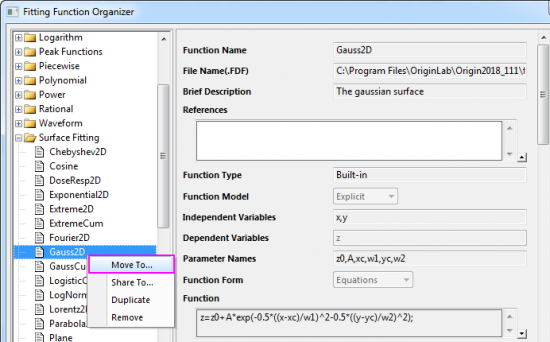
- Als Erstes müssen Sie die gewünschte 3D-Oberflächenfunktion aus der Kategorie Surface Fitting in die Kategorie User Defined im Dialog Fitfunktion verwalten verschieben.
- Aktivieren Sie das Arbeitsblatt mit den XYZ-Daten, markieren Sie die Z-Daten und wählen Sie im Menü Analyse: Anpassen: Nichtlinearer Fit, um den Dialog NLFit zu öffnen. Wählen Sie die Oberflächenfunktion, die Sie gerade als Anpassungsfunktion verschoben haben.
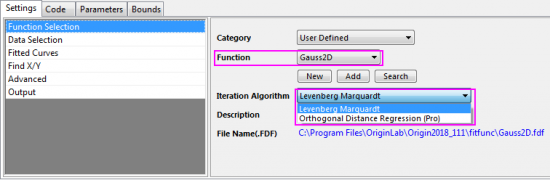
- Wenn Sie beim Iterationsalgorithmus
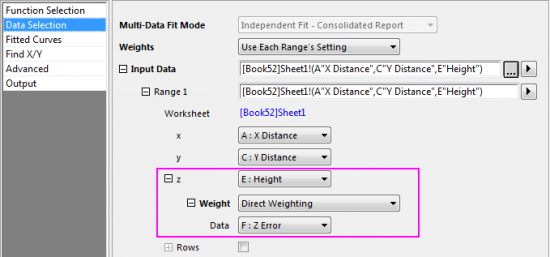
- Levenberg Marquardt wählen, können Sie nur den Z-Fehlerbalken auf der Seite Datenauswahl in die Anpassung einbinden.
-
-
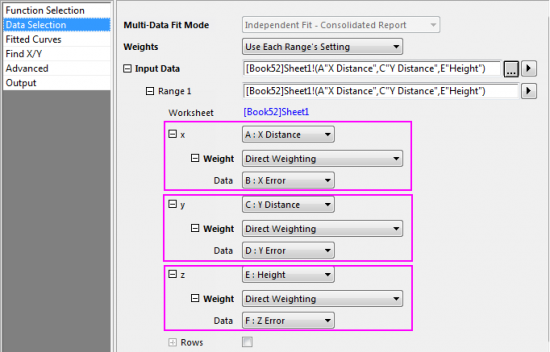
Orthogonale Distanzregression (Pro) wählen, können Fehlerbalken in allen Richtungen (X,Y und Z) in die Anpassung eingeschlossen werden.
Lesen Sie, wie Sie die Gewichtungsmethoden für die Anpassung festlegen, bitte auf dieser Hilfeseite.
- Nehmen Sie weitere notwendige Einstellungen für die Anpassung vor, um die 3D-Anpassung abzuschließen.
Schlüsselwörter:Anpassung, Oberfläche anpassen, Anpassung mit Fehler, 3D-Oberfläche mit Fehler