3.168 FAQ-1177 How to define a constant related to input data in a fitting function?
Last Update: 6/6/2023
If your user-defined fitting function has constant related to input data, you can define it as a parameter and fix it to initial formula.
For example, to define following fitting function
y = y_min + (y_max-y_min)*exp(-k*x)
where k is the parameter to calculate, and y_max and y_min are constants related to input data - y_max is the maximum of Y dataset and y_min is the minimum.
To define constant y_max and y_min in Origin,
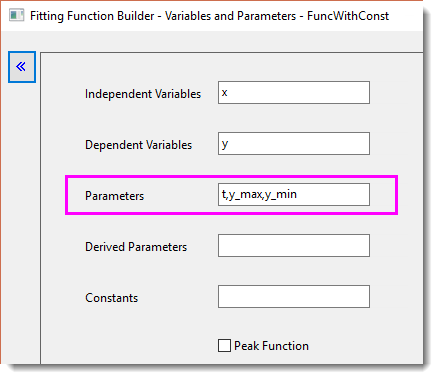
- In Fitting Function Builder > Variables and Parameters page, define k, y_max, and y_min as Parameters.
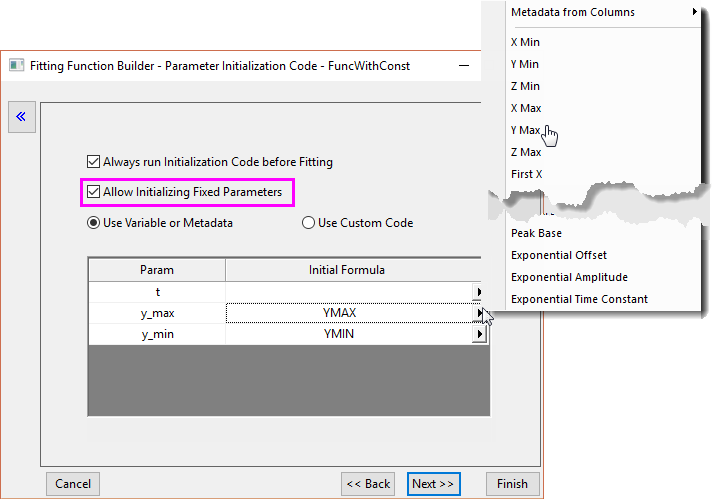
- On the Parameter Initialization Code page, specify Initial Formula for y_max and y_min by clicking the triangle button and selecting the desired formula in the fly-out list.
- Check Allow Initializing Fixed Parameters to fix y_max and y_min to their initial values.
Keywords:user defined function, initial value, nonlinear curve fit, constant, metadata