1.6 FAQ-116 How do I add or hide tick marks at specific values on axis?
Last Update: 5/6/2026
 | Origin has options for automatically hiding ticks and labels. See FAQ-121 What can I do if my tick labels are too long and overlapping? |
Add one or multiple special tick marks and labels
- Open the Axis dialog, by double-clicking on the tick labels.
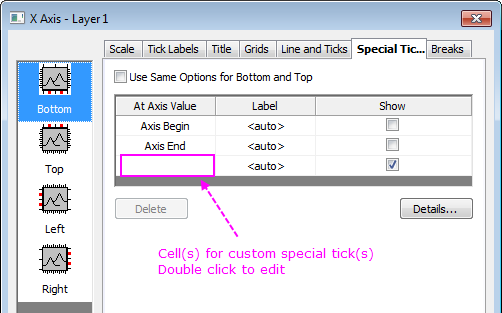
- Go to the Special Ticks tab. Double click on a cell to edit the axis value or label for a special tick:
- When a special tick is added, click the Details button to open the Special Ticks dialog to customize the tick or label format for each special tick.
Note: On one single axis, the maximum number of allowed special ticks is 10.
| Beginning with Origin 2016, you can select a special tick label then use the buttons on the Format toolbar to customize the label. |
Hide Tick label at axis begin or end

You can hide tick or tick label at any specific value of axis including axis begin or end on Special Ticks tab of Axis dialog.
One example is tick label at the end of one axis runs into the tick label at the beginning of another axis. Axis Begin and Axis End are already listed on Special Ticks tab. So just set it to Hide.
You may also wish to view this Quick Help: add a second nonlinear x or y axis
Keywords:location, label, axes, tick, tick position, hide, axis begin, axis end
Minimum Origin Version Required: 2015 SR0