1.281 FAQ-1147 When I copy Layout graph as EMF to Word 365, the quality is damaged. What should I do?
Last Update: 8/16/2022
When you select menu Edit: Copy Layout as Image or press Ctrl+Alt+J to copy a Layout window as EMF format, and then paste it to Word 365 (or some older version as well e.g. Word2019), you may find the image quality is bad.
It's because when copying image as EMF, page size is kept by default.
To fix this issue,
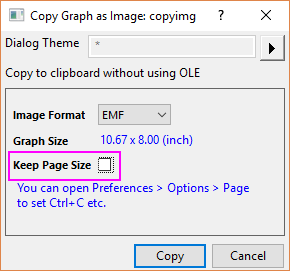
- Select menu Edit: Copy Layout as Image to open the Copy Graph as Image dialog.
- Uncheck Keep Page Size. Note that this option is added after version 2022b.
Keywords:Ctrl ALT J, copy graph, copy layout, export EMF, Word