Hinweis:Dieser Abschnitt ist nur in englischer Sprache verfügbar. Wir bitten um Ihr Verständnis.
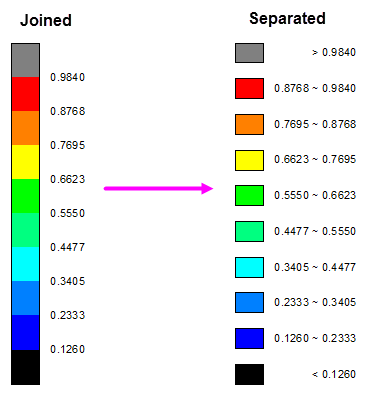
1.142 FAQ-757 How to show color scale as separated color ranges?
Last Update: 8/27/2015
Double click on the color scale to bring up Color Scale Control-Layer 1 dialog, with Layout option highlighted on the left panel select Separated option from Layout drop-down list on the right panel. The number of color ranges is determined by Level column on Color Map tab of Plot Details dialog.
Minimum Origin Version Required: 2016 SR0
Keywords:color scale,color blocks, color ranges, separated, individual