5.11 FAQ-350 How do I turn off the collapsible menus and show full menus?
Last Update: 1/3/2019
Main and context menus in Origin are collapsed by default. To view the full list of menu items, click on the expand icon  at the bottom of the menu.
Turn Off/On Collapsible Menu Feature
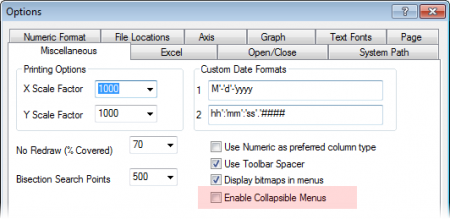
- Choose Preference: Options from Origin menu
- Clear the Enable Collapsible Menus check box in the Miscellaneous tab
-
| Notes:. You can also use the Set System Variables dialog to turn the feature off in Origin. Choose Preference: System Variables to open the dialog. Set mpa to 0. |
Reset All Menus
When you use a menu item which isn't included in the collapsible menu, it is added to the menu. Thus, the menu will grow over time. If you want to reset all menus to their shipped configuration, execute the menu -cr command in the Script Window.
Set Auto Expand Time
When you open a main menu or context menu, the menu will auto-expand following a period of time determined by the value of the system variable @mpd . To change the collapsible menu auto-expand time, change the value of @mpd (unit = seconds).
Keywords:menu, collapse, system variable, customize, full menu, long menu, simplify menu, collapsible, menus, context menu, menu customization