1.292 FAQ-1175 Why the Chinese Y axis title can not be set as bold?
Last Update: 1/28/2024
In Origin, following font types can not be shown as bolded if the labels rotate 90 or 270 degree. If your Y axis title is set as the font, it can not be shown as bolded.
- Simsun (宋体)
- NSimsun (新宋体)
- FangSong (仿宋)
- SimHei(黑体)
- KaiTi(楷体)
If you meet the problem, we have following suggestions
Method 1: Change the Font Type
Following font types supports bold for vertical labels
- Microsoft YaHei (微软雅黑)
- Deng Xian (等线)
Method 2: Change the Label Rotate Angle
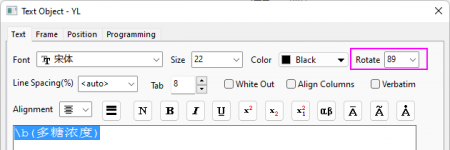
We can set the rotate angle of the label to be 89 to work around the problem
- Right click on the label and choose Properties from the context menu, set Rotate to be 89
Keywords:axes title, bold, Chinese font, rotate, rotation