1.295 FAQ-1180 How to change the font/sizes on axis tick labels and axis titles simultaneously?
Last Update: 6/9/2023
A graph usually has many texts, such as axis tick labels, axis titles, data labels, layer title, normal text objects, etc. Origin allows you to change the font and/or size of all these texts at one click. That is,
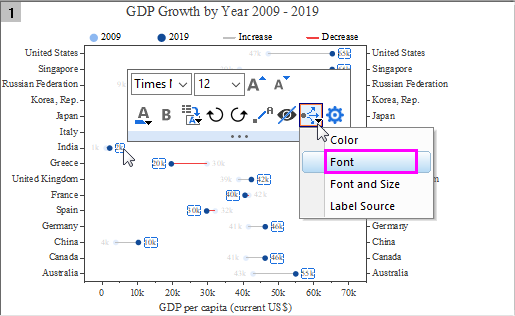
- To change text font of all texts on the graph simultaneously,
- Click on one of the axis tick labels or data labels, change font as desired from the mini toolbar that appears.
- Click Apply Formatting to button on the mini toolbar and select Font to apply the font to all texts on the graph.
Note: this method is available for axis tick labels and data labels.
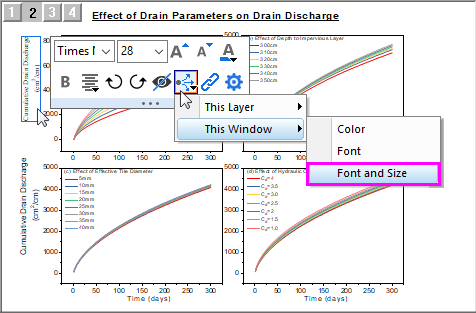
- To change font and size of axis titles or text objects simultaneously, for example, if you want to change font of all axis titles in a multiple-panel graph,
- Click on one of the X/Y axis title, and change the font and size as desired from the mini toolbar that appears.
- Click Apply Formatting to button on the mini toolbar and select This Window > Font and Size to apply font and size to XY axes in all layers.
Note: This method is available for following types of texts:
- axis title, layer title, layer label, reference line label, normal text object, color scale title
Keywords:font, format, text, label, title, size, color, axis