6.35 FAQ-39 How can I change my license server to a new machine?
Last Update: 11/19/2024
Changing the license server
If your license server is no longer functioning or is being decommissioned and you need to change the server host, please submit a System Transfer Request form. After your request is processed, you will be notified via email. You can then obtain a new license file and set up the FLEXnet service on the new server. Here is more information on FLEXnet Setup.
How to submit a System Transfer Request form
- Log in to the OriginLab website with your web membership account
- Click the Manage My License(s) link
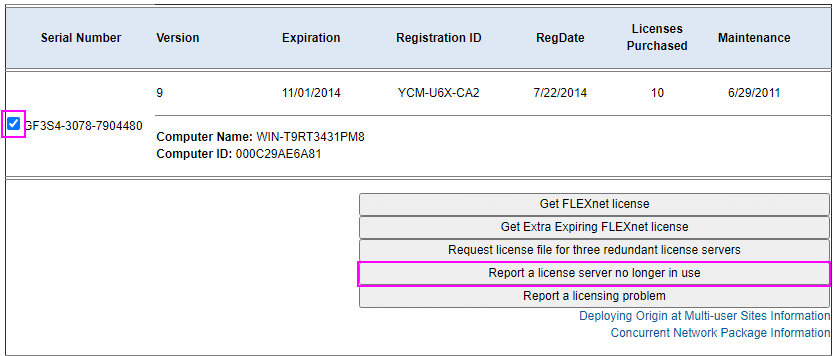
- Check the check box in front of the Serial Number you would like to transfer
- Click the Report a license server no longer in use button
- Complete the form and read the Licensing and Installation Support Policy
- Submit the request
 | Please contact OriginLab about your System Transfer request if your version is no longer supported. If you are outside of US/CAN, please contact your local distributor. |
 | Once your request is processed, you can proceed to obtain a new license file and set up the new server. |
Keywords:licensing, concurrent, system transfer, deactivate, deactivation form, network lic, change server
Minimum Origin Version Required: 8.5SR0