2.117 FAQ-1053 How to allow changing data when Data Connector is used?
Last Update: 6/3/2026
Data imported by Data Connector is "locked" by default.
- Data imported via Text/CSV and Excel Connectors is sortable but not editable.
- Data imported via Connector types other than Text/CSV and Excel, is neither sortable nor editable.
Change the Behavior of Data Connector
Starting with 2026b, Origin provides an option in the Preference: Options dialog to control the behavior of Data Connector
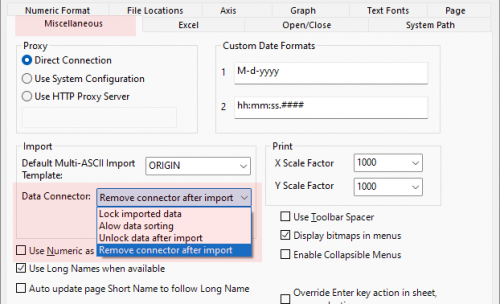
- Lock imported data : Imported data is locked and cannot be sorted or edited.( Text/CSV and Excel Connectors is sortable but not editable)
- Allow data sorting:Imported data can be sorted but not edited.
- Unlock data after import : Imported data is fully unlocked and can be freely edited and sorted.
- Remove connector after import: The Data Connector is removed once the import is complete.
Methods for Managing Editing of Connector Data that is Already Imported
To modify data that has been imported via Connector, click the Connector icon  and choose one of the following:
- Unlock Imported Data: The data remains unlocked until you click the Connector icon and choose Import (at which time, data will be overwritten and edit protections restored).
- Disconnect Sheet: Removes the connection between the worksheet/matrix and the data source. Also removes edit protections. The connector icon remains allowing you to reconnect to your Data Source (at which time, data will be overwritten and edit protections restored).
- Remove Data Connector: Permanently remove Data Connectors from all sheets in the active book. Edit protections are removed from all sheets. In addition, remove Exclude Imported When Saving check mark.
Keywords:import, connect data, CSV, TXT, DAT, Excel, Connector, sort column, sort worksheet, data integrity, data protection,