Hinweis:Dieser Abschnitt ist nur in englischer Sprache verfügbar. Wir bitten um Ihr Verständnis.
2.90 FAQ-935 How to get the average value of every 5 points?
Last Update: 6/11/2018
If you have a column of data and want to calculate the average values of every 5 points:
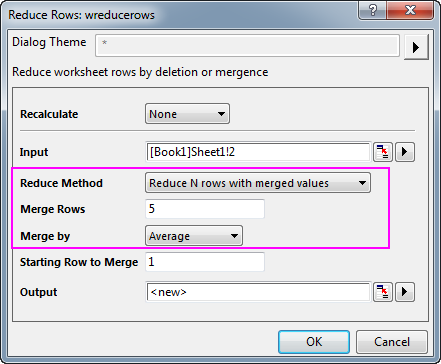
- Highlight the column with source data, right-click on it to select Worksheet: Reduce Rows to open the Reduce Rows dialog.
- In this dialog, set Reduce Method to Reduce N Rows with merged values, Merge Rows to 5, Merge by to Average, Output as <new>.
- Click OK button to get the average values.
 | If you want to get the running average values for a dataset, please try the average command, such as range aa = [Book1]Sheet1!2; ave -n 2 aa; //average values of 2 points before, 2 points after and itself |
Keywords:data reduction, reduce data points, average value, merged values, reduce rows