Hinweis:Dieser Abschnitt ist nur in englischer Sprache verfügbar. Wir bitten um Ihr Verständnis.
1.43 FAQ-159 How can I add a prime or double prime symbol in text labels?
Last Update: 7/1/2022
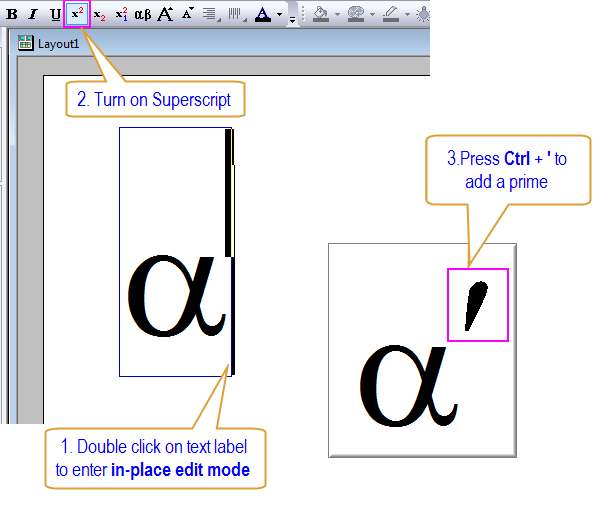
Sometimes you may want to add a prime or double prime to your text label. Taking the prime symbol as an example, in order to do that:
- Double click on the text label to enter in-place edit mode.
- Make sure superscript is turned on. i.e. In the Format toolbar, either the
 button or the
  button is pressed.
 - Press Ctrl + ' or Ctrl + P.
Alternatively...
- While in in-place edit mode, right-click and choose Insert: Symbol Map. Click the Math tab and insert a "prime" symbol (top row, positions #2, #3 and #4).
- You can use escape sequence (\+(\y('))) in the Object Properties dialog. Note that this works also for Rich Text in worksheet. You may refer to the following table for more details:
| Symbol | Example Preview | Keyboard Access (PC US English Keyboard) |
Escape Sequence |
|---|---|---|---|
| Prime | 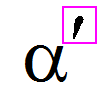
|
Ctrl + ' or Ctrl + P (When Superscript is turned on) |
\+(\y(')) |
| Single Quote Mark | 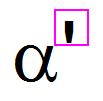
|
' |
\' |
| Double Prime | 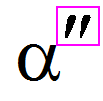
|
Ctrl + Shift + ' or Ctrl + Shift + P (When Superscript is turned on) |
\+(\y(")) |
| Double Quote Mark | 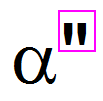
|
Shift + ' |
\" |
 | The offset from the prime (or double prime) to the base is controlled by the system variable @TAPP, to adjust the prime height change @TAPP (default 130) to a value between -1000 to 1000 and refresh to see the effect. |
Keywords:prime, double prime, offset, single quote mark, full height prime, double quote mark, escape sequence, keyboard
Minimum Origin Version Required: 2015 SR0