4.2 Run Python from Graph Object
Python code can be stored in a graphical object placed on a graph, worksheet or matrixsheet. The code gets executed if certain event of the object is triggered which is same as running Labtalk Script behind an object.
 | In order for the script to be recognized as Python, it should begin with either of the following: #,''' (triple single-quote), """ (triple double-quote), import. |
Run Python Script From a Text Object
- Create a new workbook.
- Select the Text tool
 from the Tools toolbar to the left side of the project window.
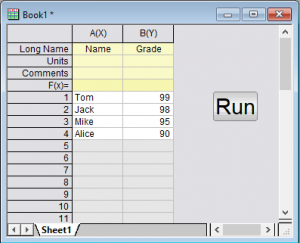
 - Click on an open space on the worksheet (click in the gray area to the right of the last column). Type "Run" in the text object and click outside the object. You have now created a label for the button.
- Hold down the ALT key while double-clicking on the text object that you just created. The object dialog opens to the Programming tab.
- In the lower text box, enter this script:
- From the Script Run After drop-down list, select Button Up, and click OK.
- Press the button and import data into the worksheet.
import pandas as pd
import originpro as op

data = {'Name':['Tom', 'Jack', 'Mike', 'Alice'],
        'Grade':[99, 98, 95, 90]}

df = pd.DataFrame(data)
wks = op.find_sheet()
wks.from_df(df)