【お知らせ】この部分は英語原文のみでの提供となります。何卒ご了承ください。
2.2.4.22.33 Grid::SetShowLabels
Contents
Description
Set multiple type labels show once.
Show the specified labels and hide others.
Syntax
BOOL SetShowLabels( vector<int> & vnTypes, BOOL bUndo = FALSE, BOOL bCol = true )
BOOL SetShowLabels( BOOL bUndo = FALSE, int nLabel1 = -1, int nLabel2 = -1, int nLabel3 = -1, int nLabel4 = -1, int nLabel5 = -1, BOOL bCol = true )
Parameters
- vnTypes
- [input] label types to set show, refer to this list.
- bUndo
- [input] to support undo mechanism
- bCol
- [input] true to set column labels, false to set row labels.
- bUndo
- [input] true to support undo mechanism
- nLabel1
- [input] the first label to set, refer to this list.
- nLabel2
- [input] the second label to set
- nLabel3
- [input] the third label to set
- nLabel4
- [input] the fourth label to set
- nLabel5
- [input] the fifth label to set
- bCol
- [input] true to set column labels, false to set row labels.
Return
TRUE if success else FALSE.
Examples
EX1
void Grid_SetShowLabels_ex1()
{
    Worksheet wks = Project.ActiveLayer();
    if(wks)
    {
        Grid gg;
        gg.Attach(wks);

        vector<int> vnTypes = {RCLT_LONG_NAME, RCLT_UNIT, RCLT_COMMENT, RCLT_PARAM};
        gg.SetShowLabels(vnTypes);
    }
}
EX2
void Grid_SetShowLabels_ex2()
{
    Worksheet wks = Project.ActiveLayer();
    if(wks)
    {
        Grid gg;
        gg.Attach(wks);

        gg.SetShowLabels(false, RCLT_UNIT, RCLT_LONG_NAME);
        wks.GetPage().Refresh();
    }
}
EX3
// This example creates a worksheet with 3 columns. Then adds two user defined parameters to the row label.
void Grid_SetUserDefinedLabelNames_ex1()
{
    Worksheet wks = Project.ActiveLayer();
    if(wks)
    {
    	Worksheet wks;
	wks.Create("Origin", CREATE_VISIBLE);
	wks.AddCol();
	Grid gg;
	gg.Attach(wks);  // attach the grid to the worksheet
        vector<string> vsUDLs = {"Operator", "MachineID"};
        gg.SetUserDefinedLabelNames(vsUDLs);   // Add two user defined labels.
        vector<int> vnTypes;
        gg.GetShowLabels(vnTypes, TRUE);   // Get the current showing column labels.
        vnTypes.Add(RCLT_UDL);
        vnTypes.Add(RCLT_UDL+1);
	gg.SetShowLabels(vnTypes); // Set the showing column labels
        wks.GetPage().Refresh();
    }
}
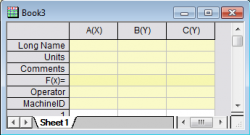
- Empty column label rows are created. To fill with label names, refer to this page.
Remark
See Also
Grid::GetShowLabels,Grid::IsLabelsShown,Grid::ShowLabels
Header to Include
origin.h