【お知らせ】この部分は英語原文のみでの提供となります。何卒ご了承ください。
4.1.3.7 Getting Started Using the Origin Dialog AppWizard
To create a resource-only DLL that is accessible in Origin using Origin C the DLL must be built using Microsoft Visual C++ version 5.0 or higher. Origin Dialog Builder includes an Origin Dialog AppWizard which simplifies the process of creating a resource-only DLL in Microsoft Visual C++. To access this wizard in Microsoft Visual C++, first copy the file
ODialog.awx
(if you haven't already done so) from this zip file under the \Dialog Builder\VisualStudio6AppWizard subfolder to the \Common\MSDev98\Template subfolder of Microsoft Visual Studio.
- 1 Start Microsoft Visual C++.
- 2 Select the File:New menu item to open the New dialog.
- 3 On theProjects tab of the New dialog from the list boxand then specify a project name and location in the associated fields.
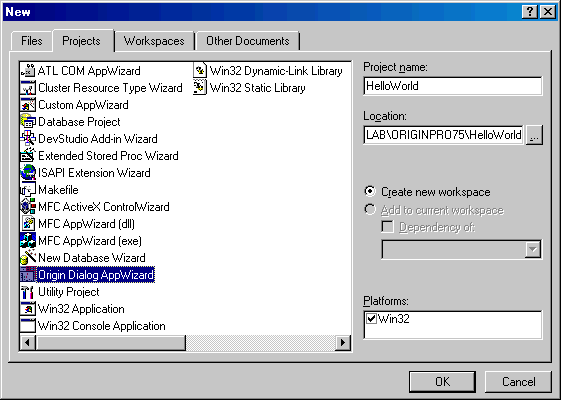
- 4 click OK. The Origin Dialog AppWizard opens in Microsoft Visual C++.