Minimum Origin Version Required: Origin 2022
In this tutorial we show
In this section, we show how to make SimpleGridDlg.h and SimpleGridDlg.cpp these two files to create a simple grid dialog.
Open Code Builder, create SimpleGridDlg.h. You can set Location to User File Folder.
#ifndef SIMPLE_GRID_DLG_H
#define SIMPLE_GRID_DLG_H

class SimpleGridDlg : public ResizeDialog
{
public:
	SimpleGridDlg(string strColHeaders, vector<string> vstrContent, bool bByRow, string strDLG);
	~SimpleGridDlg();
	int DoModalEx(HWND hWndParent = NULL);

	int GetSelAfterOK(vector<string>& vsSel);

protected:
EVENTS_BEGIN
	ON_INIT(OnInitDialog)
	ON_READY(OnReady)
	ON_SIZE(OnDlgResize)
	ON_GETMINMAXINFO(OnMinMaxInfo)
	ON_OK(OnOK)

EVENTS_END

	BOOL OnInitDialog();
	BOOL OnReady();
	BOOL OnDlgResize(int nType, int cx, int cy);
	BOOL OnOK();
private:
	string				m_strDlgName;
	string				m_strColHeaders;
	vector<string>		m_vstrContent;
	bool				m_bByRow;
	GridListControl		m_list;
};

#endif //SIMPLE_GRID_DLG_H
In Code Builder, create SimpleGridDlg.cpp. This file should be in the same folder as SimpleGridDlg.h.
#include <Origin.h>

#pragma labtalk(0)

#include <..\OriginLab\DialogEx.h>
#include "SimpleGridDlg.h"
#define STR_ODLG8_DLL GetAppPath(TRUE)+"\\OriginC\\OriginLab\\ODlg8.dll"

SimpleGridDlg::SimpleGridDlg(string strColHeaders, vector<string> vstrContent, bool bByRow, string strDLG) : ResizeDialog(IDD_GRIDLIST_DLG, STR_ODLG8_DLL)
{
	m_strDlgName 	= strDLG;
	m_strColHeaders	= strColHeaders;
	m_vstrContent	= vstrContent;
	m_bByRow		= bByRow;
}

SimpleGridDlg::~SimpleGridDlg()
{
}

int SimpleGridDlg::DoModalEx(HWND hWndParent/* = NULL*/)
{
	InitMsgMap();
	int nRet = ResizeDialog::DoModal(hWndParent);
	return nRet;
}

int SimpleGridDlg::GetSelAfterOK(vector<string>& vsSel)
{
	vsSel = m_vstrContent;
	return vsSel.GetSize();
}

BOOL SimpleGridDlg::OnInitDialog()
{
	ResizeDialog::OnInitDialog(IDC_LIST, m_strDlgName);
	Text = m_strDlgName;
	m_list.Init(IDC_LIST, *this);
	m_list.SetEditable();
	m_list.SetColHeader(m_strColHeaders);

	int nRow = m_vstrContent.GetSize()/m_list.GetNumCols();
	m_list.SetRows(nRow);
	m_list.SetTableValue(m_vstrContent, m_bByRow);
	m_list.ResizeCols();
	return true;
}

BOOL SimpleGridDlg::OnReady()
{
	SetInitReady(true);
	return true;
}

BOOL SimpleGridDlg::OnDlgResize(int nType, int cx, int cy)
{
	if(!IsInitReady())
		return true;

	MoveControlsHelper	_temp(this);
	int nGap = GetControlGap();

	RECT rrOK;
	Button btnOK = GetItem(IDOK);
	GetControlClientRect(IDOK, rrOK);
	int nButtonHeight = RECT_HEIGHT(rrOK);
	int nButtonWidth = RECT_WIDTH(rrOK);

	RECT rList;
	rList.left = nGap;
	rList.top = nGap;
	rList.right = cx - nGap;
	rList.bottom = cy - 2 * nGap - nButtonHeight;

	Control ctrlList = GetItem(IDC_LIST);
	MoveControl(ctrlList, rList);

	RECT rrCancel;
	rrCancel.right = cx - nGap;
	rrCancel.left = rrCancel.right - nButtonWidth;
	rrCancel.bottom = cy - nGap;
	rrCancel.top = rrCancel.bottom - nButtonHeight;
	MoveControl(GetItem(IDCANCEL), rrCancel);

	rrOK = rrCancel;
	rrOK.right = rrCancel.left - nGap;
	rrOK.left = rrOK.right - nButtonWidth;
	MoveControl(GetItem(IDOK), rrOK);
	return true;
}

BOOL SimpleGridDlg::OnOK()
{
	return m_list.GetRowValues(m_list.GetSelectedRow(), m_vstrContent) == true;
}

bool open_simple_grid_dlg(string strColHeaders, vector<string>& vstrContent, bool bByRow, string strDLG)
{
	SimpleGridDlg mydlg(strColHeaders, vstrContent, bByRow, strDLG);
	if(mydlg.DoModalEx() == IDOK)
	{
		int nRet = mydlg.GetSelAfterOK(vstrContent);
		return nRet > 0;
	}
	return false;
}
| Note: This dialog use the built-in Resource DLL ODlg8.dll. You can also use another Resource DLL. To learn more: read here. |
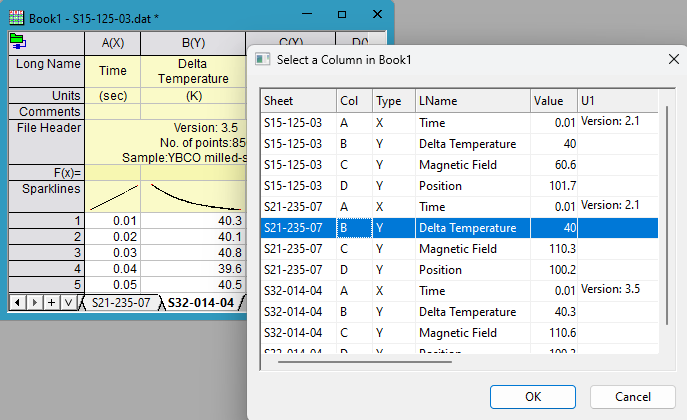
In this section we show how to get all columns in a workbook and display these columns' attributes in grid.
In Code Builder, create mytest.c. This file should be in the same folder as SimpleGridDlg.h and SimpleGridDlg.cpp.
#include <Origin.h>
#include <xfutils.h>

typedef bool (*PFN_SIMPLE_GRID_DLG)(string strColHeaders, vector<string>& vstrContent, bool bByRow, string strDLG);

#define	_GET_COL_INFO(_TYPE, _ISNAME, _ROW)				\
		{												\
			vector<string> vsInfo;						\
			if(_ISNAME)									\
				qr.GetNames(vsInfo, _TYPE);				\
			else										\
				qr.GetColInfo(vsInfo, _TYPE, _ROW);		\
			vstrContent.Append(vsInfo);					\
		}

void list_current_book_col()
{
	WorksheetPage wp = Project.Pages();
	if(!wp)
		return;

	bool bByRow = false;
	string strDLG = "Select a Column in " + wp.GetName();
	string strHeaders = "Sheet|Col|Type|LName|Value|U1|U2|Range";//range string will be used to construct the column
	vector<string> vstrContent;

	string strQuery;
	strQuery.Format("Select Column from %s", wp.GetName());
	QueryResult qr;
	int nFound = qr.Build(strQuery);

	//follow the order in strHeaders to get the column attributes
	_GET_COL_INFO(QUERYRESULTNAME_SHEET, true, 0)
	_GET_COL_INFO(QUERYRESULTNAME_SNAME, true, 0)
	_GET_COL_INFO(QUERYRESULTCOL_TYPE, false, 0)
	_GET_COL_INFO(QUERYRESULTNAME_LNAME, true, 0)
	_GET_COL_INFO(QUERYRESULTCOL_VALUE, false, 0)
	_GET_COL_INFO(QUERYRESULTCOL_UDL, false, 0)
	_GET_COL_INFO(QUERYRESULTCOL_UDL, false, 1)
	_GET_COL_INFO(QUERYRESULTNAME_RANGE, true, 0)

	//this file should be in the same folder with SimpleGridDlg.cpp/h
	string strFile = GetFilePath(__FILE__) + "SimpleGridDlg.cpp";
	PFN_SIMPLE_GRID_DLG pfn = Project.FindFunction("open_simple_grid_dlg", strFile, true);

	//display vstrContent in a simple grid dialog
	if( pfn && pfn(strHeaders, vstrContent, bByRow, strDLG) )
	{
		Column col;
		int nRangeCol = 7;
		if(vstrContent.GetSize() > nRangeCol)
			okxf_resolve_string_get_origin_object(vstrContent[nRangeCol], &col);

		if(col)
		{
			string strCol;
			col.GetRangeString(strCol);
			printf("Column: %s\n", strCol);

			//use the seleced column to make xy plot
			string strLT;
			strLT.Format("plotxy iy:=%s", strCol);
			LT_execute(strLT);
			return;
		}
	}
	out_str("error or no column selected");
}
Note:
|