Use the X-Function edit box to name the X-Function.
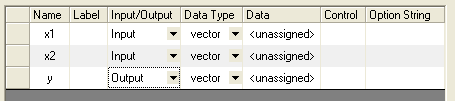
Use the Variables pane to specify variable names and labels, data types, default values, etc. To add, insert or delete variables, right-click to the left-side of the pane (see the picture below) and choose from the shortcut menu.
| Name |
Specify the name of the variable. When the X-Function is executed by script, you have to assign values to variables using their names. Therefore, we recommend that you use shorter names and begin them with different characters. |
|---|---|
| Label |
Specify a label for the variable. Special characters and white space are allowed. |
| Input/Output |
Specify whether the variable is used for input, output or both. |
| Data Type |
Specify the variable data type. |
| Data |
Specify the default value for the variable. |
| Control |
Specify the control for the variable in the dialog box (combo box, slider, etc.). |
| Option String |
Specify an option string for the variable. You can apply advanced settings with option strings, such as grouping several variables together, enabling recalculation, etc. More details can be refered to X-Function Programming CHM. |