26.4 X-Functions Script Samples Dialog Box
The XF Script Dialog is a collection of all X-Function usage, or sample scripts to implement certain tasks. One can access the XF Script Dialog as follow:
- From the main menu, select .
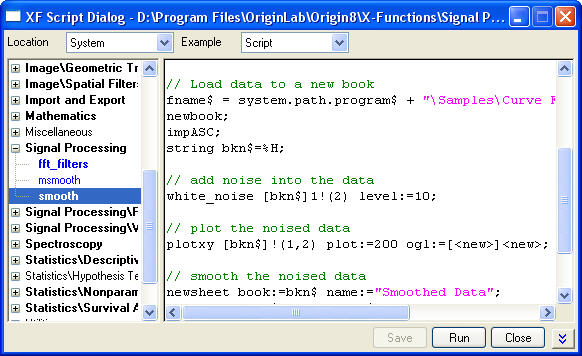
One can select an X-Function from left panel, then see or modify (User X-Functions only) the X-Function usage or sample script from right panel.
|
Note: On the left panel, X-Functions which have script examples will use bold names. For system X-Functions, you cannot edit the usage and script examples on this dialog and these X-Function names use blue font. |
The dialog controls are given as follows:
| Drop-down lists | |
|---|---|
|
Location |
Specifies what kind of X-Functions you want to see, including System built-in X-Functions, User-defined X-Functions and X-Functions shared within a group. |
|
Example |
Specifies what kind of examples you want to see, X-Function usage or script example. |
| Buttons | |
|
Save |
Specifies what kind of X-Functions you want to see, including System built-in X-Functions, User-defined X-Functions and X-Functions shared within a group. |
|
Run |
Run the script example. |
|
Close |
Close the dialog. |
 or or 
|
Expand or collapse the lower usage / variable information panel. |