7 Working with Microsoft Excel
 See more related video:Working with Excel
 | For many years, Origin supported an OLE instance of MS Excel within the Origin workspace, even though it severely limited access to Origin's graphing and analysis tools. Over time, users have reported an increase in problems and as a result, OriginLab decided to remove user interface controls for launching OLE instances of Excel. We strongly recommend that you use the Excel Data Connector for importing Excel data. The Excel Connector is fast and you have full access to Origin's graphing and analysis tools. If using the Excel Connector is not an option, please see this topic. |
Contents
There are two ways to work with Microsoft Excel data in Origin:
- Import Excel files into the Origin workbook
- Copy Excel data to the Clipboard and paste or paste-link into the Origin workbook
| Import Excel | Copy Excel Data | |
|---|---|---|
| How To |
|
|
| How Does it Work? |
|
|
| Handle Metadata |
|
|
| Graphing |
|
|
| Data Analysis |
|
|

Updating Excel Data in Origin
If you are periodically updating an Excel file, there are a couple of ways of passing updates to Origin:
- Once an Excel file is imported into an Origin workbook via The Excel Connector, updates to that file (updates must be saved) are passed to the Origin workbook.
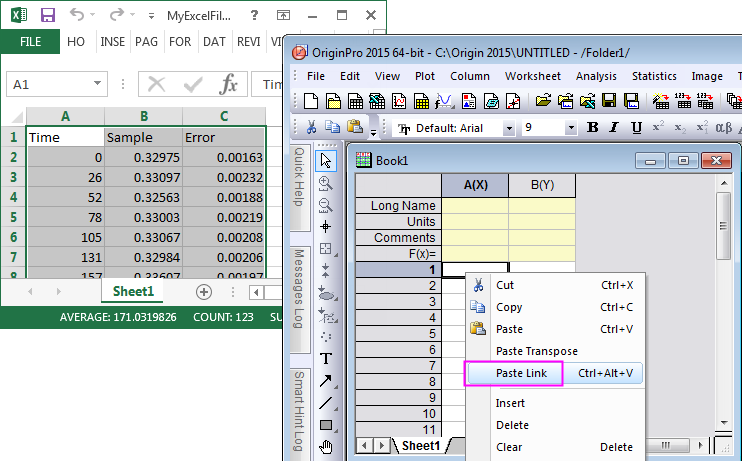
- If you are copying Excel data to the Clipboard, choose Paste Link when pasting in Origin.
Reimport Data if Changed
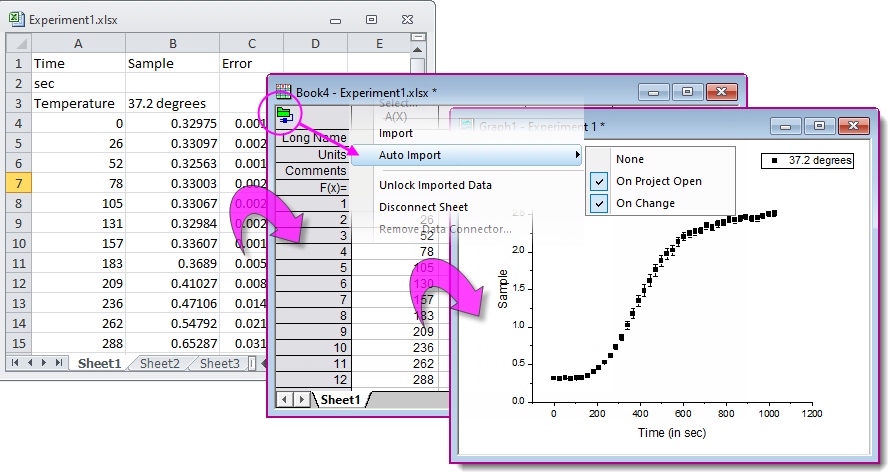
Importing data with a Data Connector creates a live link between the Origin workbook and the source data. Thus, when source data are updated, it is easy to update the Origin workbook and any dependent plots.
- Origin workbooks can be refreshed manually by clicking the Connector icon and choosing Import.
- Origin workbooks can be refreshed automatically by clicking the Connector icon and choosing Auto Import, then selecting On Project Open and/or On Change.
Copy Excel Data Outside and Paste/Paste Link into Origin
It may be desirable at times to simply copy Excel data from a workbook opened in Excel and paste/paste link into Origin to access Origin's powerful graphing and analysis features. If you choose to paste Excel data as link, any change in that Excel workbook will dynamically update Origin project.
 |
|
|
Topics covered in this section: |