3.1 Using Windows File Explorer to Preview Your Projects
Windows-File-Explorer-Preview
You can use Windows File Explorer (previously "Windows Explorer") to preview graphs in a project file.
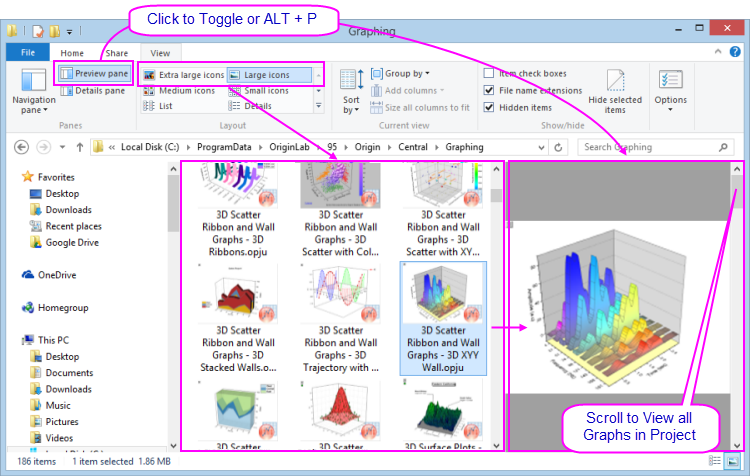
- Windows Explorer's Large or Extra large icons views (right-click in File Explorer and choose View: Large Icons or Extra Large Icons or select from the Explorer View menu) will show an image of the last active graph before the project file was saved.
- Open the Preview Pane (ALT + P) and scroll through all graphs in the selected project file.
- If you do NOT wish to save graph previews into the file (either for icon view or the Explorer Preview Pane), you can set LabTalk system variable @PESS=0 or =-1. For information on changing the value of a system variable, see FAQ-708 How do I permanently change the value of a system variable?