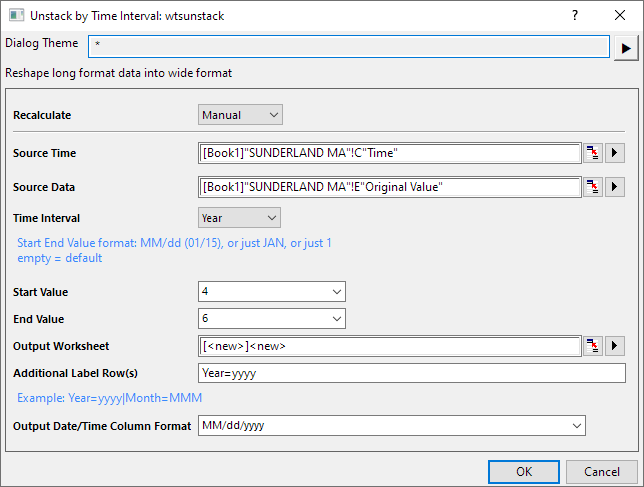
| Recalculate
|
Specify the Recalculate Mode.
|
| Source Time
|
Specify the range that will be used as the time source of Time Interval
|
| Source Data
|
Specify the range of data values to be unstacked.
|
| Time Interval
|
Options:
- Year
- Month
- Week
- Day
- Hour
- Minute
|
| Start Value
|
Specify the start time value for each unstacked group.
- When select Year as Time Interval, you can set the specified date as the start value. Format: MM/dd or JAN or 1(number of month).
- When select Month as Time Interval, you can set the specified day of month as the start value. Format: 1-28.
- When select Week as Time Interval, you can set the specified day of week index as the start value. Format:1-7.
- When select Day as Time Interval, you can set the specified hour and minute as the start value. Format: HH:mm (13:00), 13, 1pm .
- When select Hour as Time Interval, you can set the specified minute and second as the start value. Format: mm:ss.
- When select Minute as Time Interval, you can set the specified number of seconds as the start value. Format: 0-60.
|
| End Value
|
Specify the end time value for each unstacked group. The format similar as Start Value.
- When select Year as Time Interval, you can set the specified date as the end value. Format: MM/dd or JAN or 1(number of month).
- When select Month as Time Interval, you can set the specified day of month as the end value. Format: 1-31.
- When select Week as Time Interval, you can set the specified day of week index as the end value. Format:1-7.
- When select Day as Time Interval, you can set the specified hour and minute as the end value. Format: HH:mm (13:00), 13, 1pm .
- When select Hour as Time Interval, you can set the specified minute and second as the end value. Format: mm:ss.
- When select Minute as Time Interval, you can set the specified number of seconds as the end value. Format: 0-60.
|
| Output Worksheet
|
Specify where to output result table.
|
| Additional Label Row(s)
|
Add Label Rows for the year/ month/ date/ hour/ minute etc. with specified display format or modify the default interval row
- The syntax is LabelName1 = <date/time format> |LabelName2 = <date format>|…
- If the LabelName is same as selected Time Interval name, then the <date format> here will be used to modify that Time Interval label row instead of create additional label row.
- E.g. Suppose Time Interval is Year in dialog.
- Enter Month=MMM|Day=dd will create two additional label rows: Month with3 char month name, and Day with day number.
- Enter Year=yy|Month=MM will modify the interval row Year to display 2 digits year number instead of the default 4 digits year number, and add an additional row Month with month number.
|
| Output Date/Time Column Format
|
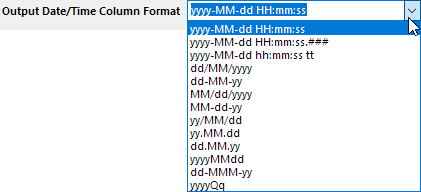
Select the format of Date/Time Column in the dropdown list.
|