8.6.5.14 The (Text Object Properties) Symbol tab
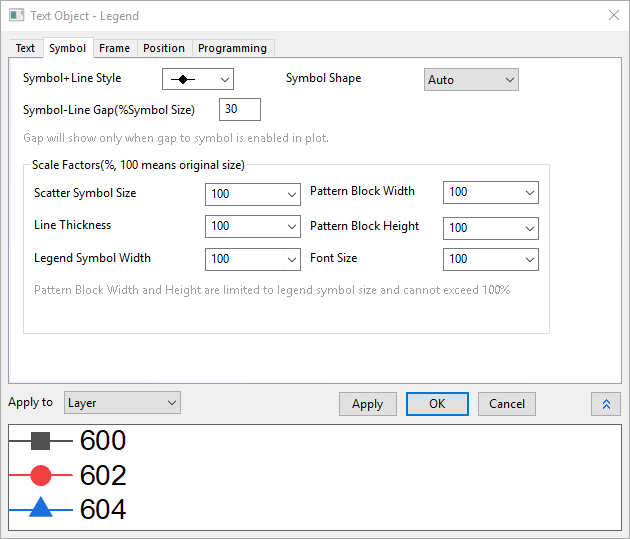
The graph legend is simply a specialized text object. When the text object is a graph legend a Symbol tab is added to the Text Object Properties dialog box.
Contents
Symbol+Line Style
For Line+Symbol plots, use this control to determine which line and symbol style to use in the legend. For Line, Scatter and Column/Bar plots, this control doesn't affect the legend display.
Symbol Shape
Use this control to decide how to show the symbols in legend box.
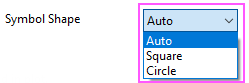
- Auto: Show symbol shape by following the plot style. It is selected by default.
- Square:Show symbols as "Squares". Default size is 15, you are allowed to change scale factor with Scatter Symbol Size option under Scale Factors group.
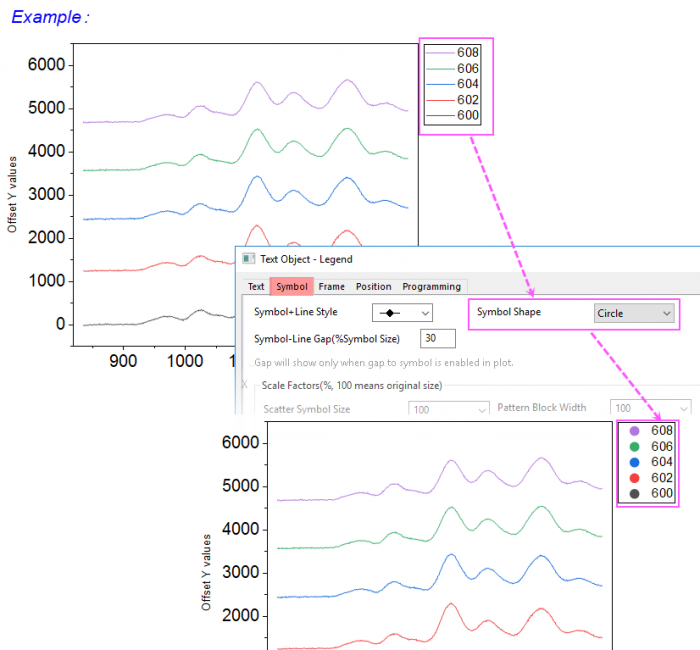
- Circle:Show symbols as "Circles". Default size is 15, you are allowed to change scale factor with Scatter Symbol Size option under Scale Factors group.
Note:
- For Line and Line+Scatter plots, both "Squares" and "Circles" are solid, colored by the plot line. For Line+Scatter plots, if Symbol Shape is not set to Auto, Symbol+Line Style control has no effect.
- For Scatter plots, both "Squares" and "Circles" are solid, colored by symbol color or edge color of the plot.
- For plots with fill pattern, like Column, Pie or Box plots, both "Squares" and "Circles" are open, the edge thickness and edge color are same as the pattern border of the plots, fill color follows the pattern fill color of the plots.
Symbol-Line Gap (%Symbol Size)
Applies to Line+Symbol graphs. Adds a gap between the line and the symbol in the legend entry. Gap to Symbol must be enabled on the Line tab of the Plot Details dialog box for this to have any effect.
Scale Factors(%, 100 means original size)
With these combo-boxes, you can choose a number from the drop-down list or type a number into the box. Note that the active dataset indicator can be turned on to show maximum symbol block width and height (in Plot Details at graph page level or by right-clicking on the legend and choosing Legend: Indicate Active Dataset).
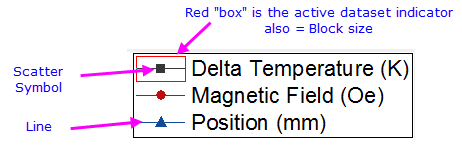
| Scatter Symbol Size |
|
|---|---|
| Line Thickness |
|
| Legend Symbol Width |
|
| Pattern Block Width |
|
| Pattern Block Height |
|
| Font Size |
|
Apply to
Apply customizations made in the legend object dialog box, to other legend objects. Note that some legend customizations, such as those made on the Text or Programming tabs, cannot be applied to other legend objects.
| Layer | Apply only to the current layer. Note that the layer supports only a single legend object. |
|---|---|
| Window | Apply to all in the window (page). |
| Folder | Apply to all in the current Project Explorer folder. |
| Project | Apply to all in the current project file. |