
A stiff diagram is a specialized graph type to display the major ion composition of a water sample.
Origin's stiff diagram is created from worksheet data with several Y columns:
 ;
;  , by skipping
  ;
; , by skipping
  .
.All these Y columns will be created as a polygon with 6 nodes: for more than 6 Y columns,  and
and  will be combined nodes.
You are also allowed to select other more columns which can be treated as additional cations or additional anions input. And, once there are any additional inions, you have to select the column label row storing the conversion factors.
Highlight the source data and open the plotstiff dialog by either of the following:
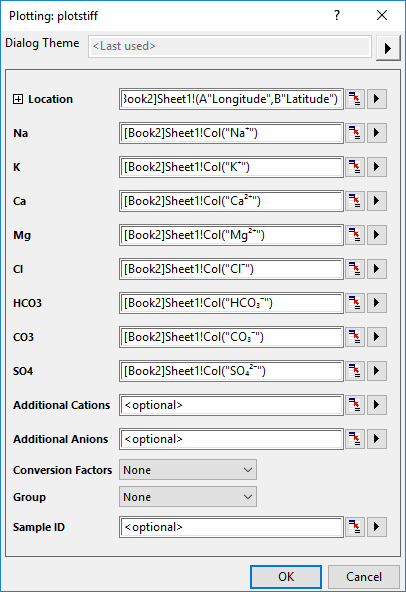
| Location | Specify the XY range to location the stiffs in a Stiff Map diagram. This option only show up when you select Plot > Specialized: Stiff Map from top menu. |
|---|---|
| Ions | Specify the input ions: Na, K, Ca, Mg, Cl, HCO3, CO3, SO4. You are allowed to not specify CO3 or K and CO3. The unit of these input values are mg/L. |
| Additional Ionic | Specify the additional ion, including Cations and Anions. The unit of these values are mg/L. |
| Conversion Factors | Conversion Factors is equal to ionic charge divided by molecular weight. The unit is Meq/mg.
|
| Group | Specify a column label row as group info for the ions. Select None means each column will be one point. If column A, B and F are one group, A and B are cations, F is anion, then A+B is one point in Cations and F is a point in Anions, and they are at same vertical position. If all 8 ions are selected to plot, and this control is set to None, Origin will use the system default grouping info, that is Na+K+Cl, Ca+HCO3+CO3 and Mg+SO4. |
| Sample ID | You can select a column to specify the sample ID to label the polygons. |
Stiff.otpu (installed to the Origin program folder).
Once you have selected multiple columns and plotted a stiff diagram:
To customize a stiff diagram, you can open the Plot Details dialog and go to the tabs below: