28 Stats Mode
What is Stats Mode?
Stats Mode was introduced in Origin 2025b to focus on statistics routine. It simplifies the Origin interface by hiding most graph toolbar buttons and advanced analysis tools, and reorganizes Graph menu to make statistical graphs easier to navigate and use. It also comes with preinstalled some popular statistical apps, e.g. DOE.

 | Since Stats Mode keeps only basic menus and buttons, if you cannot find a tool from the interface, enter the command or button name in the Search bar next to the main menu to find and run it.
|
How to Enable Stats Mode?
- Enable Stats Mode during Installation
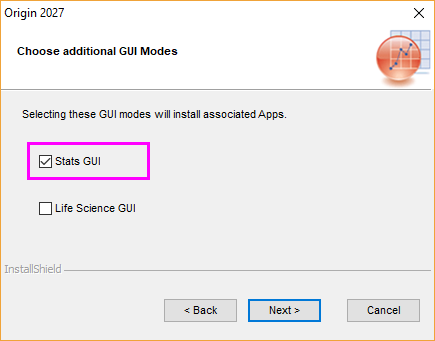
When installing Origin, you can select Stats GUI checkbox on the "Choose additional GUI Modes" page. Selecting Stats GUI will also preinstall a collection of statistical apps.
Once installation is complete, Origin will start in Stats Mode by default.Note: If you select both Stats GUI and Life Science GUI checkboxes during installation, Origin will start in Life Science Mode. You can switch to Stats Mode anytime from menu Preferences: GUI Mode: Stats.
Refer to this page for a step-by-step instruction on installing Origin. - If you have installed Origin with Default Mode,
You can switch to Stats Mode by “modifying Origin”:- Open the Windows Start menu and select Repair or Uninstall Origin 20##.
- On the Welcome page, select Modify .
- Click Next until you reach the "Choose additional GUI Modes" page, then select Stats GUI checkbox.
- Click Next as promoted to complete the installation.
Notes: When you check the Stats GUI checkbox, one of the Apps that will be pre-installed is Design of Experiments (DOE). This app requires R Software version 4.4.1 to be installed BEFORE you install OriginPro.
Use this link to download this particular R version.

How to Switch Back to Default Mode?
You can switch back to the classic interface at any time:
- Select menu Preferences: GUI Mode: Default

See Also this FQA page.