 on the Standard toolbar. In either case, the new project contains one worksheet window.
A new project is opened each time you start Origin or when you click the New Project button on the Standard toolbar. In either case, the new project contains one worksheet window.
However, you can customize the contents of this newly opened project:
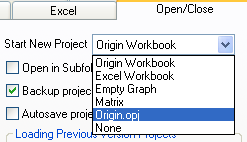
Select from Origin Workbook, Excel Workbook, Empty Graph, Matrix, ORIGIN.OPJ, or None.
The ORIGIN.OPJ file includes a worksheet and a graph window. The graph window is configured to display a data plot of column A (X values) and column B (Y values) automatically when data are imported or entered into the worksheet columns. You can customize the ORIGIN.OPJ project file and resave it.
Origin allows you to control the type of window that displays when you open a new project. This includes opening a new project from the File:New menu command, the New Project button on the Standard toolbar, and the new project that opens when you start Origin.
By default, Origin displays a worksheet window when you open a new project.
To display either an Excel workbook window, graph window, matrix window, or no window at all, or to display a worksheet and a graph window: