18.1.1 The Smooth Dialog Box
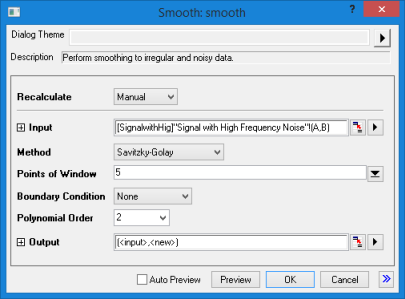
- Menu Command: Analysis: Signal Processing: Smooth
- Window Types: Workbook, Graph
- X-Function Script and GUI Examples: smooth
| Dialog Theme | See Dialog Themes. |
|---|
| Recalculate | |
|---|---|
| Input |
Specifies the input XY data range to be smoothed.
|
| Method |
Specifies the smoothing method to be used. The default is Savitzky-Golay.
|
| Weighted Average |
When Method is Adjacent-Averaging, check this box to use weighted averaging. |
| Specify Span by |
When Method is either Lowess or Loess, you can specify span by these three options:
|
| Points of Window |
When Points of Window is selected for Specify Span by, specifies the number of points in the moving window. Otherwise, you can use this parameter to control the cutoff frequency for the FFT filter. Larger values produce greater smoothing. Must be a non-zero positive value. See the algorithm section for the computation of cutoff frequency. |
| Span (0-1) |
When Proportion is selected for Specify Span by, controls the proportion value for the span. Larger values produce greater smoothing. |
| X Value |
When X Value is selected for Specify Span by, specifies the X Value. By default, this X Value is 0.1*(x max-x min). |
| Boundary Condition |
Not available when Method is FFT Filter/Lowess/Loess.
|
| Polynomial Order |
Available when Method is Savitzky-Golay. |
| Percentile |
Controls the percentile to be used in percentile filtering. The default is 50%, which corresponds to replacing the signal point with median value of the data points in the data window. Available only when Method is Percentile Filter. |
| Cutoff Frequency |
Read-only box showing the cutoff frequency of the low-pass filter. This parameter is visible only when Method is FFT Filter or Binomial. |
| Sampling Interval |
Sampling interval. Clear Auto checkbox to set Sample Interval manually. Only available when Method is Binomial. |
| Order |
Default value is 1. Clear the Auto checkbox to set Order manually. Only available when Method is Binomial. |
| Output |
Determine where to output the smoothed signal. See Output Results. |