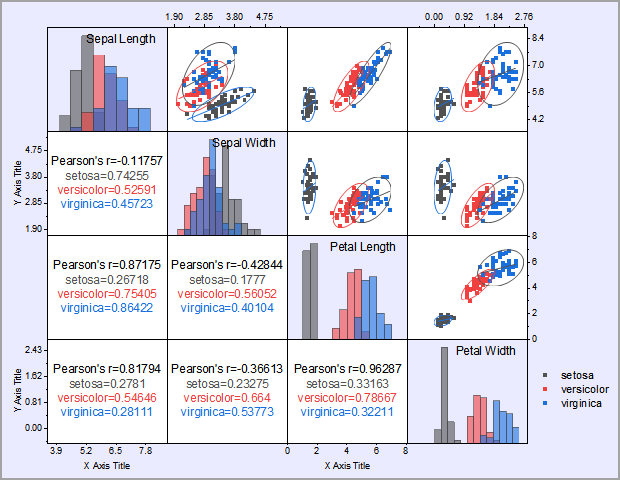
A scatter matrix is a pair-wise scatter plot of several variables presented in a matrix format. It can be used to determine whether the variables are correlated and whether the correlation is positive or negative.
To create a scatter matrix:
 on the 2D Graphs toolbar.
Each selected column (or a range of it) is plotted against every other selected column (or a range of it) as a scatter plot layer and all layers are presented in a matrix format in the graph.
You can use its dialog to control the creation of the scatter matrix.
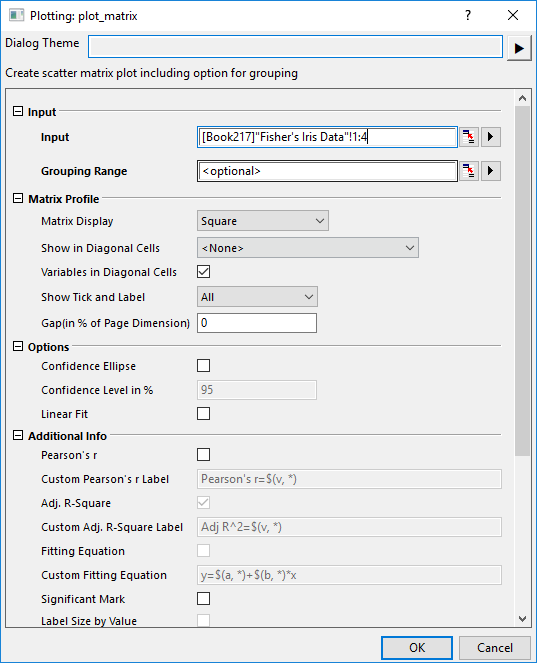
| Input | Specify the input data range. At least select two Y worksheet columns (or a range from at least two Y columns). |
|---|---|
| Grouping Range |
Specify the grouping range. The scatters will be colored by the level in the grouping range. |
| Matrix Display |
The matrix format can be one of four arrangements
| ||||||||
|---|---|---|---|---|---|---|---|---|---|
| Additional Statistics Info in | When select Mixed in Matrix Display, it will be available. Specify the position of the additional statistics info.
| ||||||||
| Show in Diagonal Cells |
| ||||||||
| Variables in Diagonal Cells |
Specify whether to display the long name of columns from source data. | ||||||||
| Show Tick and Label |
The way of tick and labels arrangement can be one of the options below
| ||||||||
| Gap (in % of Page Dimension) |
Specify whether to show gap between each layer. Type a value in the box to control the spacing between the layers in units of % of the width. |
| Confidence Ellipse |
If this is checked, a confidence ellipse will be drawn for each graph based on the chosen confidence level. |
|---|---|
| Confidence Level in % | This is only available when Confidence Ellipse is checked. Use it to specify the confidence level in percentage for the confidence ellipses. This value must be greater than 0 and less than 100. |
| Linear Fit |
Perform a linear fit to each pair of variables.
|
| Pearson's r | Add a text label for Pearson's r (correlation coefficient) value, to each scatter plot. |
|---|---|
| Custom Pearson's r Label | Custom the label of Pearson's r info, when Pearson's r option is checked. |
| Adj. R-Square | Add a text label for adjusted R-squared value resulting from the linear fit, to each scatter plot. By default, the option is selected but dimmed and only becomes editable when the Linear Fit option is selected (when dimmed, no text label is created). |
| Custom Adj. R-Square Label | Custom the label of Adj. R-Square info, when Adj. R-Square option is checked. |
| Fitting Equation | Specify whether display the equation for the linear fit line. This option is only available when Linear Fit check box is checked under Options branch. |
| Custom Fitting Equation | Once Fitting Equation is checked, this option will be available for you to customize the equation. The default value of custom fitting equation is |
| Significant Mark | Specify whether show the significant mark for additional statistics info |
| Significant Level | It's default value are 0.05 0.01 0.001. It means there is 3 levels, if correlation coefficient<0.001, significant mark is ***, 0.001<correlation coefficient<0.01, significant mark is **, and so on, when value >0.05, mark is empty |
| Label Size by Value | This option is only available when
In such case, it will vary the size of label according to value. |
Specify whether to exclude missing values (listwise). That is, exclude the entire row for all datasets if there are any missing values in this row.
| Scatter | Specify the Template for Scatter plot output. |
|---|---|
| Box | Specify the Template for Box charts output. This option would be deactivated when None is selected in Show in Diagonal Cells under Matrix Profile node. |
| Histogram | Specify the Template for Histogram plot output. This option would be deactivated when None is selected in Show in Diagonal Cells under Matrix Profile node. |
| Distribution Curve | Specify the template for Distribution Curve output. This option would be deactivated when None is selected in Show in Diagonal Cells under Matrix Profile node. |
This determines where the calculated data for the ellipse and the fit are stored. The default location is a new worksheet (<new>) within the source workbook ([<input>]).
This determines where the statistics data for Pearson's r, Adj. R-square and Fitting Equation are stored. The default location is a new worksheet (<new>) within the source workbook ([<input>]).
|
Note: selecting N datasets or ranges will result in N^2-N graphs and an even larger number of datasets. Selecting a large number of datasets or ranges may increase the computation time dramatically and produce small graphs. |
 | From Origin 2023b, if the Grouping Range is specified, it will output the result (including Confidence Ellipse, Linear Fit, Statistics info) for each individual group. In the diagonal cells, the color of plots is also following to the group color of the Scatter plots. |


