4.6.9.6 The Project Variables Dialog Box
This dialog is used to view project variables so as to insert the desired one(s) into Column Formula or Before Formula Scripts edit box in the Set Values dialog. Changes in project variables can be updated by holding Ctrl + F5 key.
To open the dialog,
- In the Set Values dialog, select Variables: Project Variables.
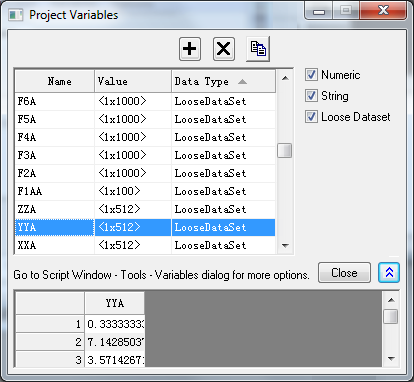
The Project Variables dialog is a short version of LabTalk Variables and Functions dialog, showing only variables of the project level and thus only the project variable related features are accessible. To view all variables, please use the LabTalk Variables and Functions dialog from Script Window.
Buttons
Add 
|
Add a variable. It will open the Define Variable dialog. |
|---|---|
Delete 
|
Delete the selected variable. |
Copy Name 
|
Copy the name of the selected variable to avoid typo when insert it into Column Formula or Before Formula Scripts edit box in the Set Values dialog. |
Show/Hide Values 
|
Show/Hide the Values Panel. |
Variable List
Lists all project variables information, including names, values, and data type (Numeric, String, Constant, Loose Dataset, etc.).
Checkboxes
Select or deselect the checkboxes to show or hide desired variable types.
The Project Variables dialog only lists variables of Project level:
| Numeric | String | Loose Dataset |
Values Panel
Show values of the selected variables in the Variable List. Only Loose Dataset shows values in this panel.