10.1.6 Picking Data Points
Picking-Points
Origin provides two approaches to pick data points on 2D graph,
Pick Points with X-Function pickpts
To open the X-Function dialog, with the graph window active, enter
pickpts -d;
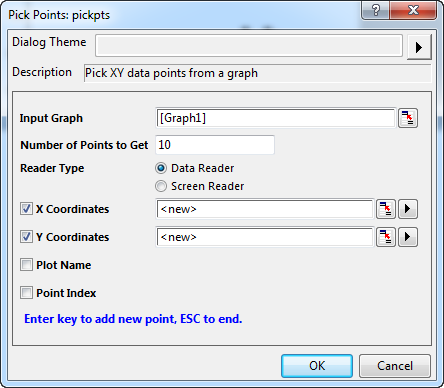
With this tool, you can pick data points in two modes: Data Reader and Screen Reader. And, you can customize the output items as your needs. To learn the details, you can refer to these examples.
Pick Points with Pick Data Points tool
Since Origin 2018b, you can use a mini tool Pick Data Points to pick data points on a graph.
To pick data points on 2D graph:
- With the graph window active, select Data: Pick Data Points menu. A mini dialog Pick Points will be opened.
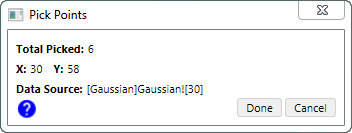
In this dialog, you can check
- the actual X and Y values of current selected data points
- the total number of the picked points
- the data source info of current data points
Click on the blue question mark, to expand the tips panel to learn more shortcut key info.
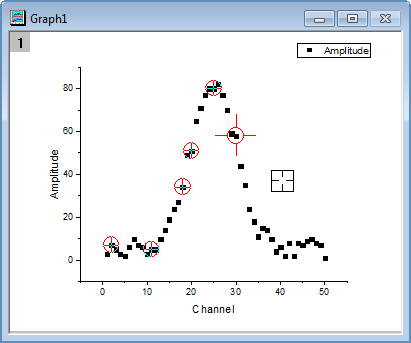
- Double-click on the data point to pick it with the square cross-hair. Once the points have been picked, a round cross-hair will dock on the points.
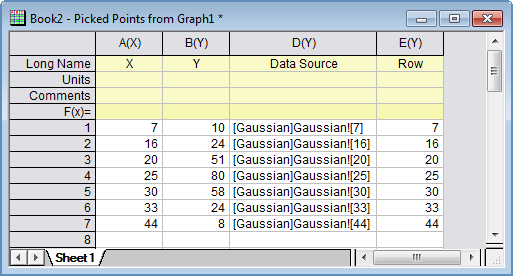
- Click Done button to generate the result workbook as below.