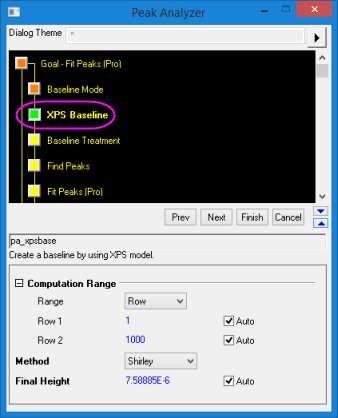
| Range
|
Specify a method to set the computation range of the spectrum data.
- Row: Specify the computation range by the row indices of the spectrum data points.
- Energy: Specify the computation range by the energy values of the spectrum data. Energy can be viewed as the x values of the spectrum data.
|
| Row1
|
This is available only when Row is selected in the Range drop-down list. It specifies the starting row index of the computation range. When the Auto check box is selected, Row1 will be determined by the Peak Analyzer automatically and Row value is Read Only.
|
| Row2
|
This is available only when Row is selected in the Range drop-down list. It specifies the ending row index of the computation range. When the Auto check box is selected, Row2 will be determined by the Peak Analyzer automatically and Row value is Read Only.
|
| Energy(X) 1
|
This is available only when Energy is selected in the Range drop-down list. It specifies the starting energy value(or x value) of the computation range. When the Auto check box is selected, Energy(X) 1 will be determined by the Peak Analyzer automatically and Energy value is Read Only.
|
| Energy(X) 2
|
This is available only when Energy is selected in the Range drop-downlist. It specifies the ending energy value(or x value) of the computation range. When the Auto check box is selected, Energy(X) 2 will be determined by the Peak Analyzer automatically and Energy value is Read Only.
|