Peak Analyzer, End Points Weighted Baseline Page
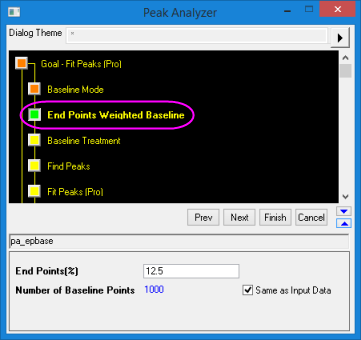
This page is added to the Peak Analyzer when End Points Weighted is selected for Baseline Mode. Use it to specify settings for creating a smoothed curve as a baseline using data points from two ends of the input data.
-
- Menu Command: Analysis: Peaks and Baseline: Peak Analyzer: Open Dialog
- Window Types: Workbook, Graph
Dialog Theme
Dialog Box Controls
| End Points(%) |
Specify the percentage of end points to create baseline. |
| Number of Baseline Points |
Specify the number of points for creating baseline. If the Same as Input Data check-box is selected, the number of baseline points will be the number of points in the input data. |
- Peaks analysieren, Seite Ziel (Startseite)
- Peak Analyzer, Baseline Mode Page
- Peak Analyzer, XPS Baseline
- Peak Analyzer, End Points Weighted Baseline Page
- Peak Analyzer, ALS Baseline
- Peak Analyzer, Create Baseline Page
- Peak Analyzer, Baseline Treatment Page
- Peak Analyzer, Subtract Baseline
- Peaks analysieren, Seite Peaks suchen
- Peaks analysieren, Seite Peaks integrieren
- Peaks analysieren, Seite Peaks anpassen
- Dialog Peak-Fit Parameter