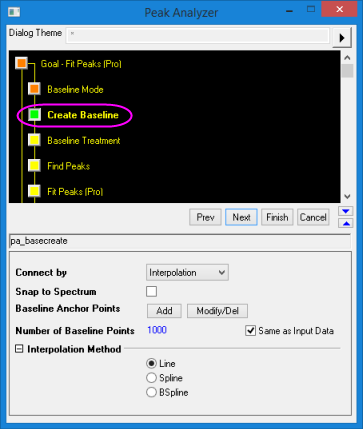
| Connect By
|
Use this drop-down list to specify how to connect the baseline anchor points to create the baseline.
- Interpolation: Create an interpolated line through the baseline points. Interpolation Method shown below includes Line, Spline or BSpline.
- Fit with Function (OriginPro Only): All the fitting functions under "Baseline" category will be in the drop-down list. The available functions can be viewed in Fitting Function Organizer (press F9 with main interface activated)
|
| Snap to Spectrum
|
Use this to specify whether you want the baseline anchor points to be snapped to the spectrum data. If this is selected, the baseline anchor points will be pulled onto the spectrum as you add or move them.
|
| Add
|
When this button is clicked, you are allowed to add baseline anchor points manually, by double-clicking on the graph that has the spectrum data.
|
| Modify/Del
|
When this button is clicked, you are allowed to move or delete existing baseline anchor points manually.
|
| Number of Baseline Points
|
Specifies the number of points in the baseline dataset. There is a Same X as Input check box to the right. If this check box is selected, the number of points in the baseline dataset will be equal to the number of points in the spectrum data set.
|
| Parameters
|
Available when Fit with Function is selected. After the fitting is done, the fitted parameter values are displayed in this branch.
|