9.5.2.4 The (Plot Details) Surface Tab 2

| Note: prior to Origin 2016, xyz (worksheet data) were normalized before surface plots were generated; Beginning with Origin 2016, raw x and y data values are used. See Normalize Data for XYZ Contour/Surface Plot. |
Contents
Display
Flat
Check this check box to flat the surface on the bottom XY plane.
Shift in Z by percent of scale range, 0=bottom, 100=top
Check this check box to enter a number among 0 and 100 to shift the XY panel at Z axis.
Transparency
Specify the transparency of the surface.
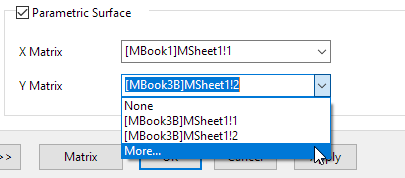
Parametric Surface
This check box is only available when the graph source is matrixes. Check this box to make X Matrix and Y Matrix drop down list available.
With these two drop-down list, you can specify the matrix objects as X and Y matrix to plot a paramatric surface.
In the drop-down list, it lists matrix object the same matrix sheet. Select More... option to open the Dataset Browser dialog to specify other matrix in the the project.