9.5.3.1 The (Plot Details) 3D Vector Tab
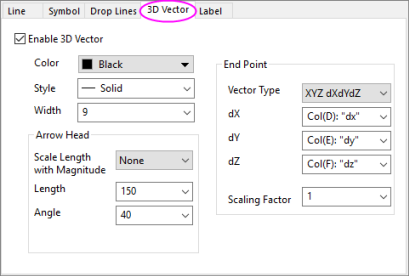
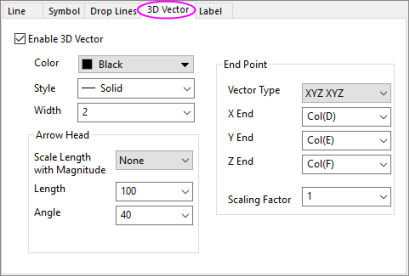
Starting with Origin 8.5, 3D vector plots can be created from XYZ XYZ data that specifies the start point and the end point of a vector. Alternately, you can create a 3D vector from XYZ dXdYdZ data, which plots the vector dXdYdZ from the starting point XYZ. After you create a 3D vector graph, you can easily do the following things within the 3D Vector tab below:
- Specify the color of the vectors using another data set
- Rescale all the vectors to avoid overlap
- Set the arrow head size according to the magnitude of the vectors
|
|
| The 3 Vector tab for 3D Vector XYZ dXdYdZ graphs | The 3 Vector tab for 3D Vector XYZ XYZ graphs |
Enable 3D Vector
Specify whether to enable 3D Vectors. If you have created a 3D Vector graph from the toolbar or main menu, the check box will be automatically enabled.
Color
Select a vector color from the Color button.
Style
Choose Solid (default) or one of the dash/dot line styles.
Width
Type or select the desired vector width in the Width combination box. Units are measured in points.
Arrowheads group controls
| Scale Length with Magnitude |
Scale the lengths of the arrowheads according to changes in magnitude of the vectors. Available options include:
|
|---|---|
| Length |
Determines the length of the arrowheads. Units are measured in points. |
| Angle |
Determines the arrowhead angles in degrees. |
| Closed/Open |
Select the Closed radio button to display filled arrowheads. Select the Open radio button to display hollow (transparent) arrowheads. |
End Point Group
| Vector Type | Specify whether to create an XYZ XYZ 3D vector or an XYZ dXdYdZ 3D vector. |
|---|---|
| XEnd | This is only available when XYZ XYZ has been selected in the Vector Type drop-down list. It allows you to select the column that contains the X end point values from the X End drop-down list. |
| YEnd | This is only available when XYZ XYZ has been selected in the Vector Type drop-down list. It allows you to select the column that contains the Y end point values from the Y End drop-down list. |
| ZEnd | This is only available when XYZ XYZ has been selected in the Vector Type drop-down list. It allows you to select the column that contains the Z end point values from the Z End drop-down list. |
| dX | This is only available when XYZ dXdYdZ has been selected in the Vector Type drop-down list. It allows you to select the X component of the dXdYdZ vector. |
| dY | This is only available when XYZ dXdYdZ has been selected in the Vector Type drop-down list. It allows you to select the Y component of the dXdYdZ vector. |
| dZ | This is only available when XYZ dXdYdZ has been selected in the Vector Type drop-down list. It allows you to select the Z component of the dXdYdZ vector. |
| Scaling Factor |
Select or type a value by which to scale the length of the vectors. For example, type .5 to draw the vectors at half their original lengths. |