30.1.13 The Object Edit Toolbar

The Object Edit toolbar is available when one or more graph objects are selected in the active window, or when more than one picture is selected in a layout page, even when one or more layers are selected in a graph page. The toolbar provides buttons to align the selected objects/pictures, to change the drawing order of the objects/pictures/layers and swap the position of two selected objects/pictures/layers. Buttons are provided to group objects so that you can move or align the group. Additionally, buttons are provided to change the drawing order of objects relative to data plots.
 | Another way to select layers in a multi-layer graph is to press CTRL or SHIFT while clicking on the layer icons in the upper left-corner of the graph page. |
| If a single graph layer is selected, clicking this toolbar will align it relative to page. |

|
Aligns selected objects along the left edge of the last-selected object. |

|
Aligns selected objects along the right edge of the last-selected object. |

|
Aligns selected objects along the top edge of the last-selected object. |

|
Aligns selected objects along the bottom edge of the last-selected object. |

|
Aligns selected objects vertically along the vertical axis of the last-selected object. |

|
Aligns selected objects horizontally along the horizontal axis of the last-selected object. |

|
Keep the position of the top and the bottom selected object, and distribute selected objects vertically to space at equal distances from each other. |

|
Keep the position of the rightmost and the leftmost selected objects , and distribute selected objects horizontally to space at equal distances from each other. |

|
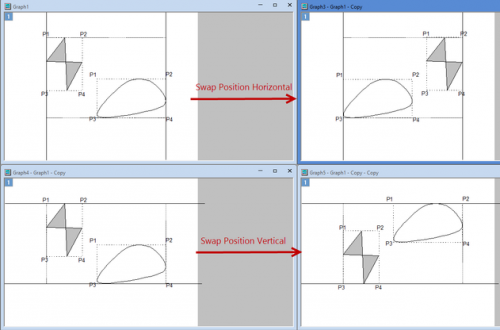
Swap the postion of two selected graph objects/pictures/layers. You can select a swapping way from the fly-out list below: Note:
|

|
Adjusts the horizontal dimension of selected objects to that of the last-selected object. |

|
Adjusts the vertical dimension of selected objects to that of the last-selected object. |

|
Brings the selected object(s) to the front. |

|
Brings the selected object(s) forward. |

|
Pushes the selected object(s) backward. |

|
Pushes the selected object(s) to the back. |

|
Draws the selected object(s) in front of the data. |

|
Draws the selected object(s) in back of the data. |

|
Group the selected objects. |

|
Ungroup the selected objects. |