15.2.4 The Multiple Linear Regression Dialog Box
Multiple Linear Regression fits multiple independent variables with the following model:
y = β0 + β1x1 + β2x2 + .. + βnxn
where βn are the coefficients.
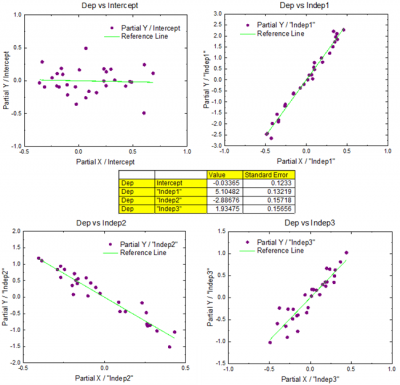
An unique feature in Multiple Linear Regression is a Partial Leverage Plot output, which can help to study the relationship between the independent variable and a given dependent variable:
Contents
Supporting Information
Origin's multiple linear regression dialog box can be opened from an active worksheet. From the menu:
- Click Analysis: Fitting: Multiple Linear Regression (Open Dialog...).
See Also:
Recalculate
| Recalculate |
Controls recalculation of fitting results upon changes to source data:
For more information, see: Recalculating Analysis Results |
|---|
Input
For help with range controls, see: Specifying Your Input Data.
| Range | The XY data range.
Dependent Data
Independent Data
Error Bar / Weight
|
|---|
 | If you pre-select data before opening the Multiple Regression dialog box, your X columns will be entered as Independent Data and your Y column will be entered as Dependent Data. Columns designated as yEr± will be entered into the Error/Bar Weight box. To learn more, see Column Plot Designations. |
Fit Control
| Beginning with Origin 2022b, the MLR dialog supports use of a named range in place of numeric input (e.g. intercept or custom weight). For more information, see this OriginLab blog post. |
| Errors as Weight |
Use error bars values for weighting. A designated error bar column (yEr±) must be selected:
| ||
|---|---|---|---|
| Fix Intercept |
Fix the Y intercept. | ||
| Fix Intercept at |
Intercept value. | ||
| Scale Error with sqrt(Reduced Chi-Sqr) |
Available only when Direct Weighting or Instrumental is selected for Error as Weight. Use reduced chi-square to calculate the errors of the parameters. This option does not affect the fitting process or the fitted curve. This is checked by default and the covariance matrix is calculated by: \(\sigma (x'x)^{-1}\,\!\), otherwise, \((x'x)^{-1}\,\!\). When it is checked, it uses reduced Chi-Sqr to estimate error variance, and parameter's standard error is scaled by it, otherwise error variance is specified with 1, and parameter's standard error is not scaled.
| ||
| Invalid Weight Data Treatment |
| ||
| Custom Weight |
Set the value of Custom Weight. This option is available when Replace with Custom Value is selected. |
Quantities
| Fit Parameters |
Value
Standard Error
LCL
UCL
Confidence level for Parameters (%)
t-Value
Prob > |t|
Cl Half-Width
VIF
For more information, see: Parameters. |
|---|---|
| Fit Statistics |
Number of Points
Degrees of Freedom
R Value
Residual Sum of Squares
R-Square (COD)
Adj. R-Square
Root-MSE (SD)
Norm of Residuals
For more information, see Statistics. |
| Fit Summary |
Select to output the fit summary table. This table organizes all the selected fit parameters by row for each curve (dependent data). |
| ANOVA |
Output the analysis of variance table. For more information, see: ANOVA Table |
| Lack of Fit Test |
Output the Lack of Fit results for fitting replicate data, which is used to measure the adequacy of the specified model. For more information, see: Lack of Fit Table |
| Covariance matrix |
Output the covariance matrix. |
| Correlation matrix |
Output the correlation matrix. |
| Fitted Values |
Output the fitted values to result worksheet. |
Residual Analysis
For more information, see Graphic Residual Analysis.
| Regular |
Output the regular (raw) residuals. |
|---|---|
| Standardized |
Output the standardized residuals. |
| Studentized |
Output the studentized (internally studentized ) residuals. |
| Studentized deleted |
Output studentized deleted (externally studentized) residuals. |
Output
| Dataset Identifier |
|
|---|---|
| Report Tables |
Destination of report tables.
|
| Fitted Curves |
Destination workbooks and worksheet for the fitted values.
|
| Fit Residuals |
Destination workbook and worksheet for residual values.
|
| Partial Leverage Values |
Destination workbook and worksheet for partial leverage values.
|
| Optional Report Tables |
Notes
Input Data
Masked Data
Missing Data
|
Plots
For more information on residuals, see Graphic Residual Analysis.
| Predicted vs. the Order of the Data Plot |
Specify whether to show the predicted vs. the order of the data plot. |
|---|---|
| Stack with Residual Plot |
Specify whether to show the residual plots stacked with the Predicted vs. the order of the data plot. |
| Partial Leverage Plots |
Specify whether to show the partial leverage plots. |
| Residual Plots |
Use the controls in this branch to customize the residual plots.
For the selected residual type, you can opt to output up to five residual plots:
|