25.2.1 Launching the Tool
 | To communicate Origin with individual instance of Mathematica directly, you must configure Mathematica to run Origin's kernel OSequencer.exe. Otherwise Origin can only communicate with a Mathematica kernel that is launched when the Mathematica Link tool is invoked. |
Configure Mathematica to run Origin's kernel OSequencer.exe when starts up
- Start Mathematica, select Evaluate: Kernel Configuration Options from Mathematica main menu.
- In the dialog that opens, click Add button to bring up the Kernel Properties dialog.
- Give a name to the Kernel. Set Arguments to MLOpen as -LinkName "<Origin install folder path>\OSequencer -mathlink -noicon". Note that full path of OSequencer.exe is needed.
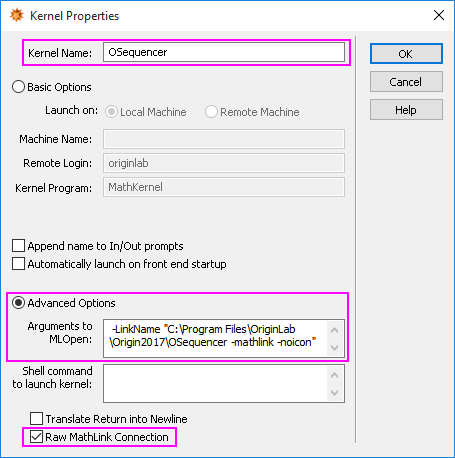
The kernel named "OSequncer" is now added to the list.
Launch the Mathematica Link tool in Origin.
- Select from Origin main menu Connectivity: Mathematica Link, Origin will ask for Mathematica's Kernel for the first time.
- Locate Mathematica installation folder, and then select MathKernel.exe.
- The Origin Link for Mathematica dialog is then open.
 | Once done, you can go to folder C:\Users\<username>\AppData\Local\Temp and open the OMAthLinkConfig.INI file. [MathKernelExecutable] Location=C:\Program Files\Wolfram Research\Mathematica\<MathVersion>\MathKernel.exe Check if the path points to the correct Mathematica installation folder with which you want Origin to communicate. It is especially important when you have more than one version of Mathematica installed. If not the correct path, you can:
Or
|