16.4 XYZ Trace Interpolation
Contents
Description
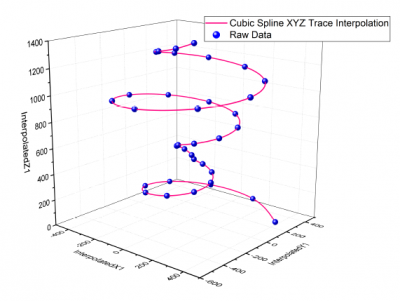
XYZ Trace Interpolation performs two-dimensional interpolation on data exhibiting some periodicity. Ordinary interpolation methods perform "nearest neighbor" calculations which have the potential to ignore trends in cyclic data. Trace interpolation acts on the curve based on row index number, thus preserving the sequential aspect of the data. Choose from one of three methods: Linear, Cubic Spline and Cubic B-Spline.
To Perform Trace Interpolation on XYZ Data
- Select Analysis: Mathematics: XYZ Trace Interpolation.... This opens the interpxyz dialog box.
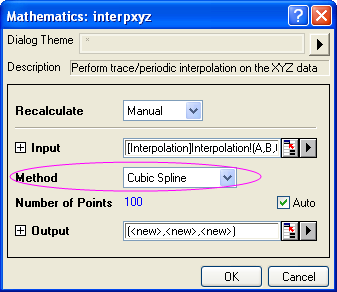
- Specify the Input and desired Method as well as Number of Points.
- Upon clicking OK, three new columns containing XYZ interpolated values are added on the initial data worksheet (other output options are available).
Dialog Options
| Recalculate |
Controls recalculation of analysis results
For more information, see: Recalculating Analysis Results |
|---|---|
| Input |
Specifies the XYZ range to be interpolated. For help with range controls, see: Specifying Your Input Data |
| Method |
Specify the interpolation/extrapolation method.
|
| Number of Points |
The number of interpolated points. |
| Output |
Specifies the output XY data range |
Examples
- Import Interpolation.dat, which is in the <Origin Installation Directory>\Samples\Mathematics\ folder.
- Highlight Column C and set the column designation to Z. Then select Analysis: Mathematics: XYZ Trace Interpolation from the Origin menu to bring up the dialog.
- Note that the Input branch has been filled with the proper data range. Then select the Cubic Spline interpolation method.
- Click OK to perform the interpolation.
Algorithm
In general, between two adjacent data points, the data points will be interpolated so that the number of data points in the final result data set will be equal to the Number of Points variable.
The detailed algorithm is described below:
Given a sequence of distinct triplets of data (\[x_i\,\], \[y_i\,\],\[z_i\,\]), where i = 0, 1, ... n-1:
For \(x_i<x<x_{i+1},x=x_i+\frac j{npts}\left( x_{i+1}-x_i\right)\),
For \(y_i<y<y_{i+1},y=y_i+\frac j{npts}\left( y_{i+1}-y_i\right)\),
For \(z_i<z<z_{i+1},z=z_i+\frac j{npts}\left( z_{i+1}-z_i\right)\),
where j=1,2,3...(npts-1), and npts is the value of Number of Points.