16.13 Polygon Area
Math-PolygonArea
Description
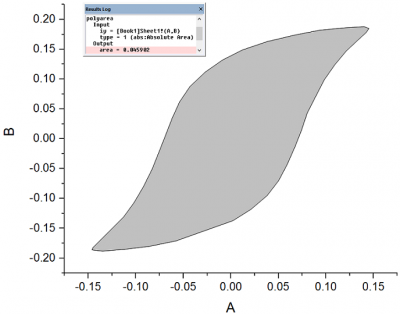
The Polygon Area tool calculates a non-self-intersecting polygon in XY plane, using the determinant of a multivariate matrix.
To Use Polygon Area Tool
- Highlight the input data in the worksheet or activate the plot that contains the input data.
- Select Analysis: Mathematics: Polygon Area from the Origin menu to open the polyarea dialog. The polyarea dialog box uses the polyarea X-Function to compute the area of the polygon. Results are output to the Results Log.
Dialog Options
| Input
|
The input XY range should define an enclosed area.
|
| Area Type
|
- Mathematical Area
- The area value can be positive or negative, and is calculated using the formula provided in the Algorithm section.
- Absolute Area
- The absolute value of the signed area, which is always positive. See the Algorithm section for details.
|
Examples
- Create a new workbook and import the data file <Origin Installation Directory>\Samples\Mathematics\Circle.dat into it.
- Highlight Column B and select Plot: Line: Line from the main menu to make a graph.
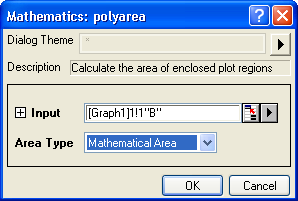
- Make sure that the graph created in the last step is active. Then select Analysis: Mathematics: Polygon Area from the main menu to open the polyarea dialog. Choose Mathematical Area with the Area Type drop-down list. Finally, click the OK button.
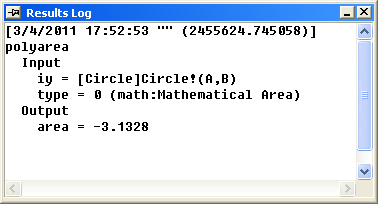
- The result is in the Results Log.
Algorithm
This X-Function is capable of calculating the (signed) area of a non-self-intersecting polygon in the  plane. Suppose the vertices of the polygon are
  . The mathematical area can be calculated as:


In the case of a convex polygon, if the vertices are listed sequentially in a counterclockwise direction, the mathematical area of the polygon will be positive; if listed in a clockwise direction, the mathematical area will be negative.
The absolute area of the polygon is calculated as the absolute value of the mathematical area.