16.6 3D Interpolation
Overview
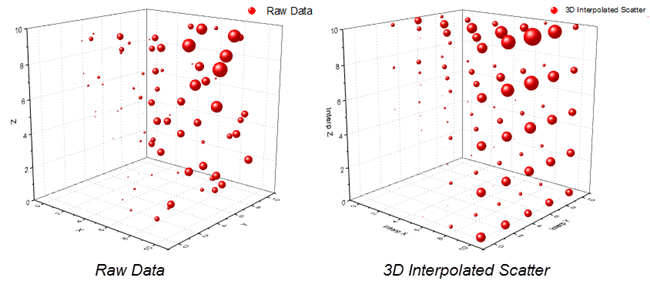
3D Interpolation tool uses a smooth function Q(x,y,z), which is a modification of Shepard's method, to interpolate m scattered data points. You can specify the X/Y/Z Minimum and Maximum and number of interpolation points in each dimension for 3D interpolation.
To Use 3D Interpolation Tool
- Create a new worksheet with X, Y, Z (data) columns, plus a fourth column of values each of which is associated by row index number with a set of XYZ coordinates.
- Activate the worksheet.
- Select Analysis: Mathematics: 3D Interpolation. This opens the interp3 dialog box.
- Choose your input and output options and click OK. The X-Function interp3 is called to perform the calculation.
Dialog Options
| Recalculate |
Controls recalculation of analysis results
For more information, see: Recalculating Analysis Results |
|---|---|
| Input |
Specify the input data range.
For help with range controls, see: Specifying Your Input Data |
| Computation Control |
Specify parameters of interpolated points.
|
| Output |
The output result for the interpolated data. |
Algorithm
This function constructs a smooth function \(Q(x,y,z)\!\) which interpolates a set of \(m\!\) scatter data points \((x_r,y_r,z_r,f_r)\!\) for \(r= 1, 2, ... , m\!\), using a modification of Shepard's method. It then evaluates the interpolant at the set of selected points \((u_r,v_r,w_r)\!\), as well as its first partial derivatives. The surface is continuous and has continuous first partial derivatives.
\[Q(x,y,z)=\frac{ \sum \omega _r(x,y,z)q_r}{ \sum \omega _r(x,y,z)} \]
where
\[q_r=f_r,w_r(x,y,z)=\frac{1}{d_r^2},d_r^2=(x-x_r)^2+(y-y_r)^2+(z-z_r)^2\]
For more information on algorithms, please see documentation for these NAG functions:
References
For reference information, please see documentation for these NAG functions: