16.8 2D Volume Integrate (Pro Only)
Overview
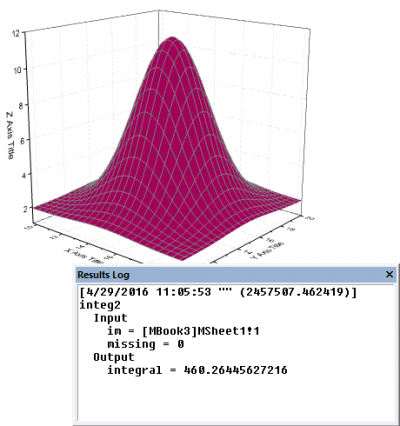
2D Volume Integration tool calculates the volume between the plane Z=0 and the matrix surface, by two-dimensional integration. Two-dimensional volume integration can be performed on a matrix window or on a plot of matrix data.
To Use 2D Volume Integration Tool
- Create a new matrix with data.
- Activate the matrix.
- Select Analysis: Mathematics: 2D Volume Intergrate from the Origin menu to open the integ2 dialog.
- Choose your options and click OK. The X-Function integ2 is called to perform the calculation.
Dialog Options
| Input Matrix |
The operating matrix. |
|---|---|
| Interpolate for Missing Value |
Trim missing values if this parameter is true. |
Algorithm
This function computes the volume beneath the matrix surface using a numeric integral method.
For a continuous surface \(z=f(x,y),(x,y)\in \sigma\), the volume beneath it can be computed as:
\(\iint_{(\sigma)}f(x,y)dxdy\),
Using a numeric method, it can be written as:
\[\iint_{(\sigma)}f(x,y)dxdy=\lim_{\Delta x \to 0}\lim_{\Delta y \to 0} \sum_{i=0}^{m-1} \sum_{j=0}^{n-1} f(x_{i,}y_j)\Delta x\Delta y\approx \sum_{i=0}^{m-1} \sum_{j=0}^{n-1} f(x_i,y_j)\Delta x\Delta y\]
where the M, N is the number of the rows and columns of the matrix respectively. In the actual process of computing,
\[\left( f\left( x_i,y_j\right) +f(x_i,y_{j+1})+f(x_{i+1},y_j)+f(x_{i+1},y_{j+1})\right)/ 4 \]
is used instead of \(f(x_i,y_j)\!\).