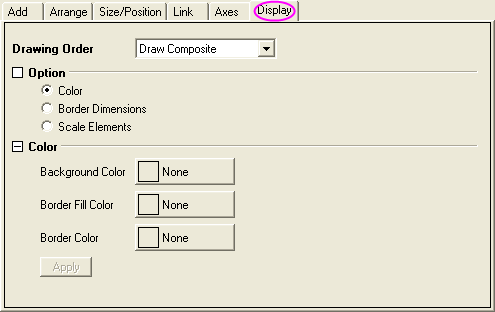
| Drawing Order |
Use this drop-down list to specify the drawing order of the layers. Options include:
|
|---|
There are three radio boxes (Color、Border Dimensions、Scale Elements)here. You can check one of them to set the Display tab.
| Background Color |
Use this color list to choose the background color for the selected layer(s). |
|---|---|
| Border Fill Color |
Use this color list to choose the border fill color for the selected layer(s). |
| Border Color |
Use this color list to choose the border color for the selected layer(s). |
| Apply |
When this button is clicked, the Color settings that you have changed will be applied in preview graphs, and you can see it in the Preview panel. |
| Border Dimensions(% of Layer) |
If the checkbox of Border Dimensions in Option is checked, you can modify the border position with the following four text boxes:
|
|---|---|
| Apply |
When this button is clicked, the Border Dimensions settings that you have changed will be applied in preview graphs, and you can see it in the Preview panel. |
| Scale Mode |
Specify how the axes, axes labels, legend, data plots, and other objects that are attached to the Layer Frame or Layer and Scales are affected when a layer in the new graph page is resized.
|
|---|---|
| Fixed Factor |
This variable is available only when the Scale drop-down is set to Fixed Factor. It specifies the fixed scale factor. |
| Apply |
When this button is clicked, the Scale Elements settings that you have changed will be applied in preview graphs, and you can see it in the Preview panel. |