4.4.4 Join Worksheets by Label
When you have multiple worksheets and want to join them together into a signal worksheet by matching the column label row, you can use the Join Worksheets by Label tool.
To open this tool, with a workbook window activated,
- Select Restructure : Join Worksheets by Label... menu;
Or
- Run
wjoinbylabel -d;in Script Window or Command Window.
This tool utilizes the wjoinbylabel X-Function.
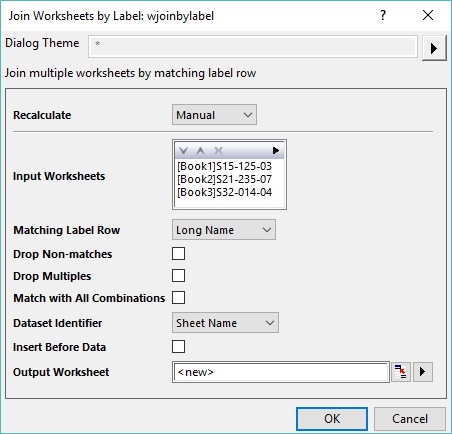
Contents
Dialog Controls
Recalculate
Specify the Recalculate Mode.
- None
- Auto
- Manual
Input Worksheets
Specify the input worksheets you want to join. See the details about how to select input worksheets with the display box and toolbar.
Matching Label Rows
Specify the matching label row condition to join the worksheets, including Long Name, Units, Comments etc..
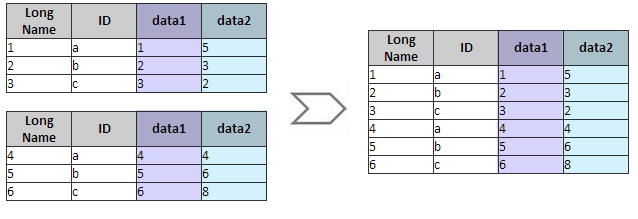
Drop Non-matches
Specify whether to drop the columns with non-matched label row.
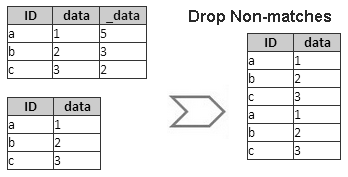
Drop Multiples
Specify whether to keep the first column with matched label row and drop the others.
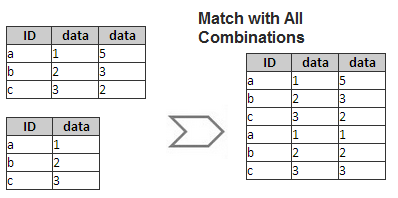
Match with All Combinations
Specify whether to show all combinations for columns with matched Label Rows.
Dataset Identifier
Specify whether to add a column with Long Name of "Source" to the result worksheet for identifying the source worksheets.
- None: "Source" column will not be added.
- Range
- Book Name
- Sheet Name
- Index: identify source sheet by index specified in Index. Format is StartIndex:Increment. For example,
1:1will identify source worksheets as 1,2,3,...
- Sheet Label: Show the sheet label of source worksheet.
Insert Identifier Before Data
Select this checkbox to insert the Data Identifier column before merged data columns. Otherwise the identifier column will append to the end.
Output Worksheet
Specify the output worksheet.