6.4.8.4.1 Import Wizard, The Header Bytes Page (Binary)
Use this page to define the binary file header and to extract variables from the header for later use.
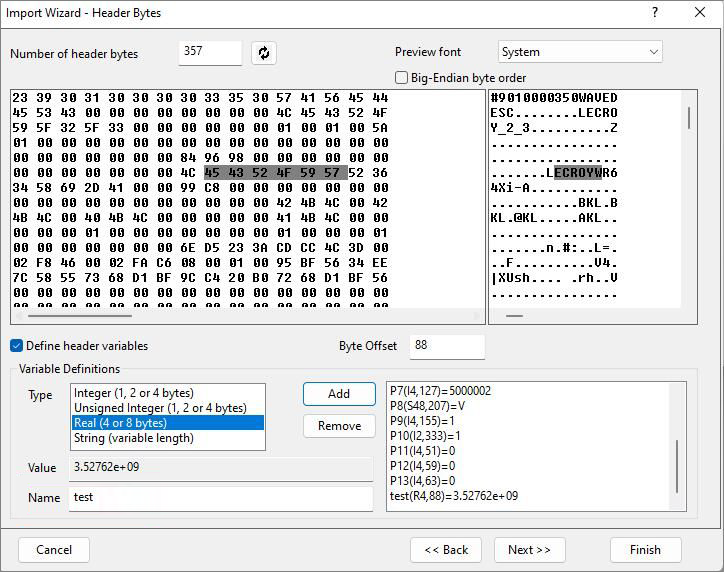
Header Bytes Controls
| Number of header bytes |
Specify the number of bytes in the binary file header section by typing in a number or select the header section graphically. To select graphically, place the cursor at the desired location in either preview panel (HEX or ASCII), and then click the refresh button |
|---|---|
| Preview font |
Select a font for the Preview window. |
| Big-Endian byte order |
Use this check box to specify the byte order of the import data. |

Preview Window
The left panel displays the data in byte form, while the right panel shows the data as ASCII text. You can place the cursor on either panel to select Number of header bytes or Byte Offset graphically.
Variables
| Define header variables |
Select this box to define and extract variables from the header section of the file. Selecting the box enables other page controls used in defining of variables. |
|---|---|
| Byte Offset |
Enter a variable's byte offset (in the header section) in this text box. The hex or ASCII data file displays update to reflect the offset. You can graphically specify the byte offset by clicking in the hex or ASCII data file views. The text box is updated with the byte offset value. |
| The Variable Definitions Group |
Once you specify the byte offset:
|